
Digital Receptionist, redone
The hybrid home. Her name is Bella.
The prototype opens on the decided direction. A, B and C stay linked in section 3 for context only. The receptionist's name is a per-business setting (Greeting and voice); Bella is the default in copy.
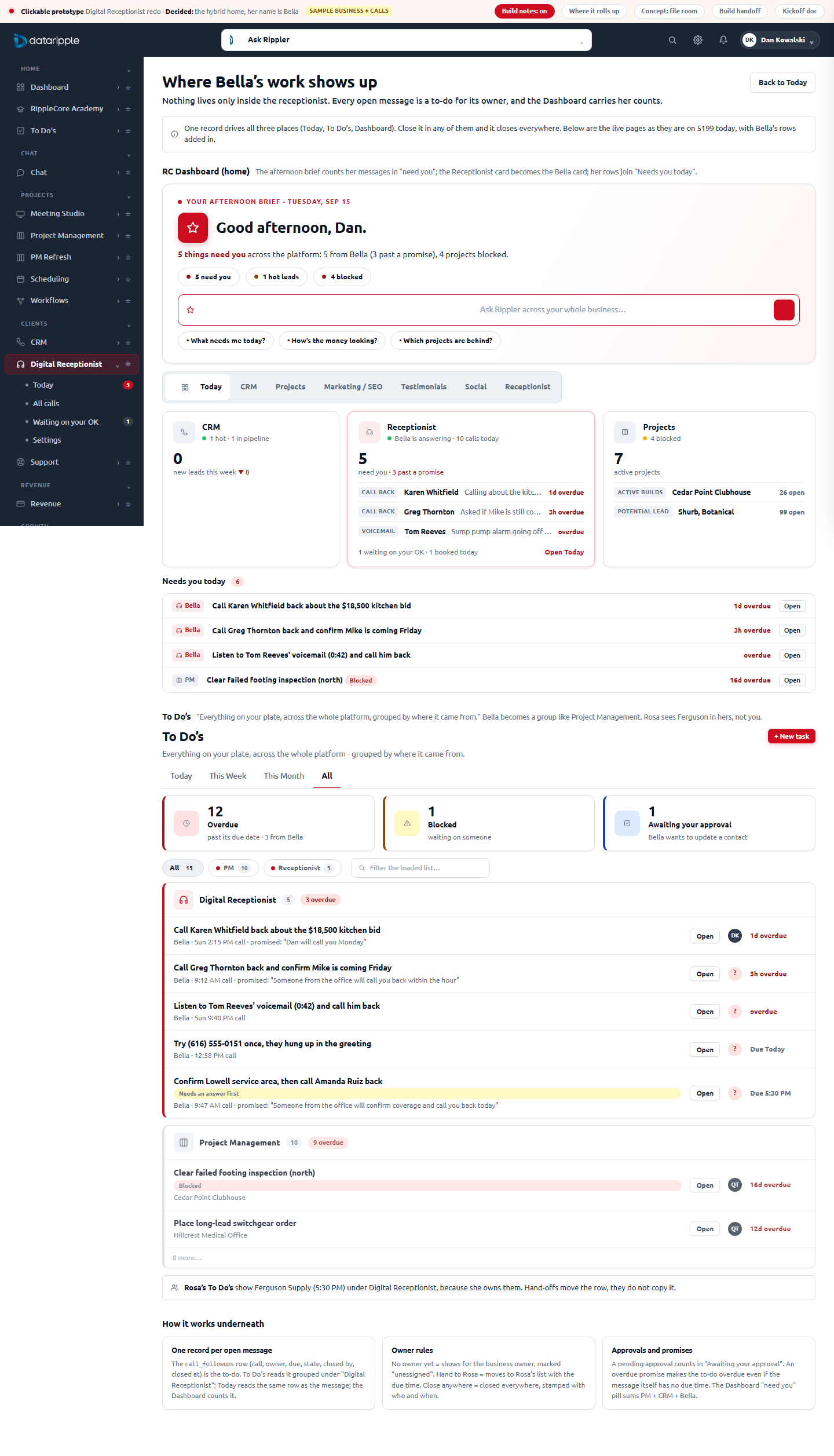
Her open messages roll up into To Do's and the RC Dashboard.
One record per open message drives Today, a "Digital Receptionist" group in To Do's, and the Bella card plus "Needs you today" on the Dashboard. Close it anywhere, it closes everywhere. See the rollup page.
The "While You Were Out" message slip.
Every call becomes the one office document nobody has ever needed training to read: who, when, number, what they wanted, what she did, what she promised, and one obvious next button. All three council members picked it independently.
Is she on. Who needs me. What did she say in my name.
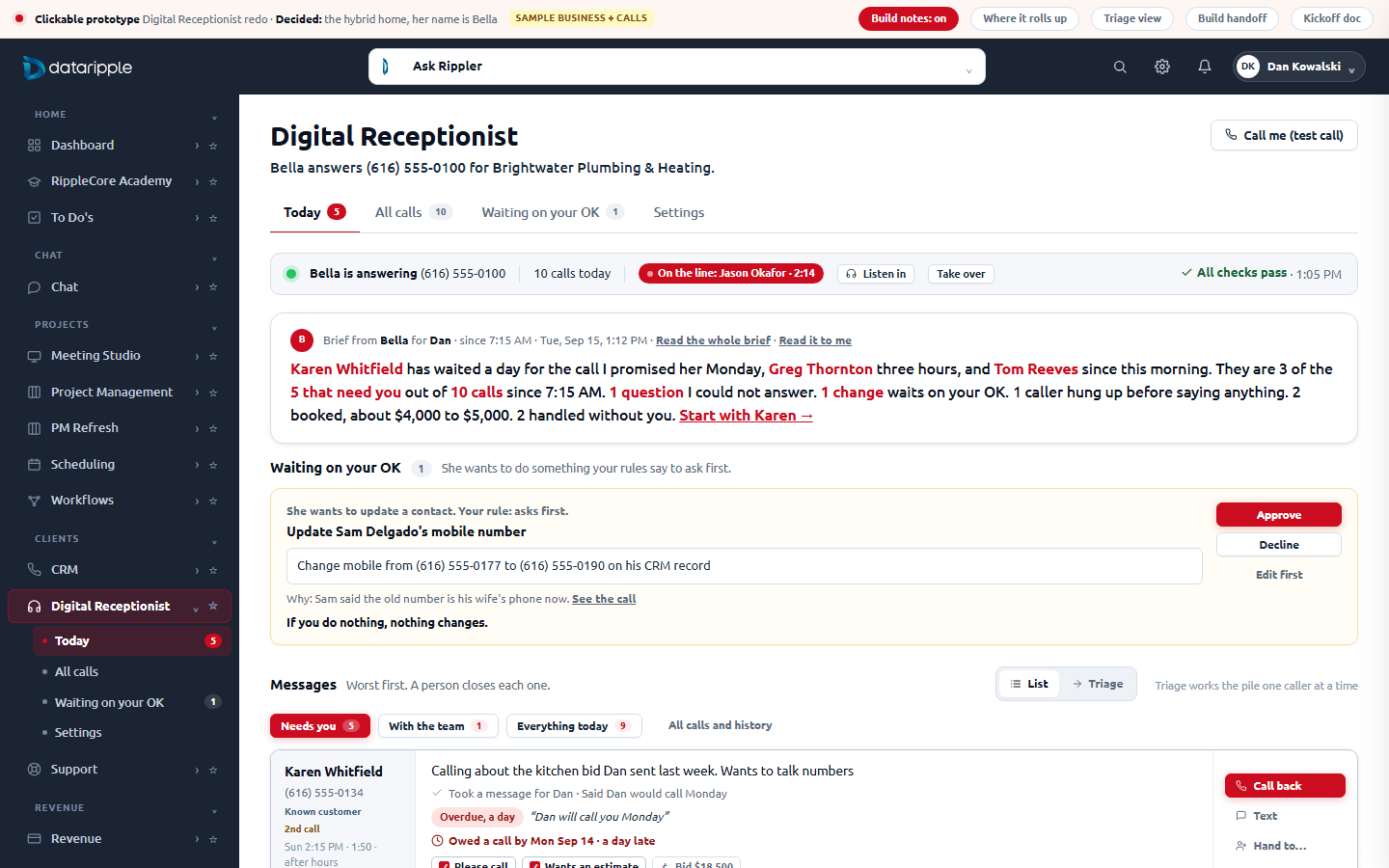
A one-line status, a three-sentence brief, then the pile of slips with "Needs you" open by default. Handled work is a count, not a competitor. Setup is one door away, never on the same plane as calls.
A promise ledger and a question loop.
Every commitment she speaks gets its own line with a clock, kept only when a person confirms. Every question she could not answer becomes a published answer in one click, and the next call proves it was used.
Nine equal tabs, and the one that answers "is it working" is the ninth
Reviewed signed in on the local v3 app (localhost:5199, the QA tenant) plus the source under app/features/receptionist/ (18 files, 7,535 lines) and the backend rules doc. Screenshots below are the real pages, not the mock.
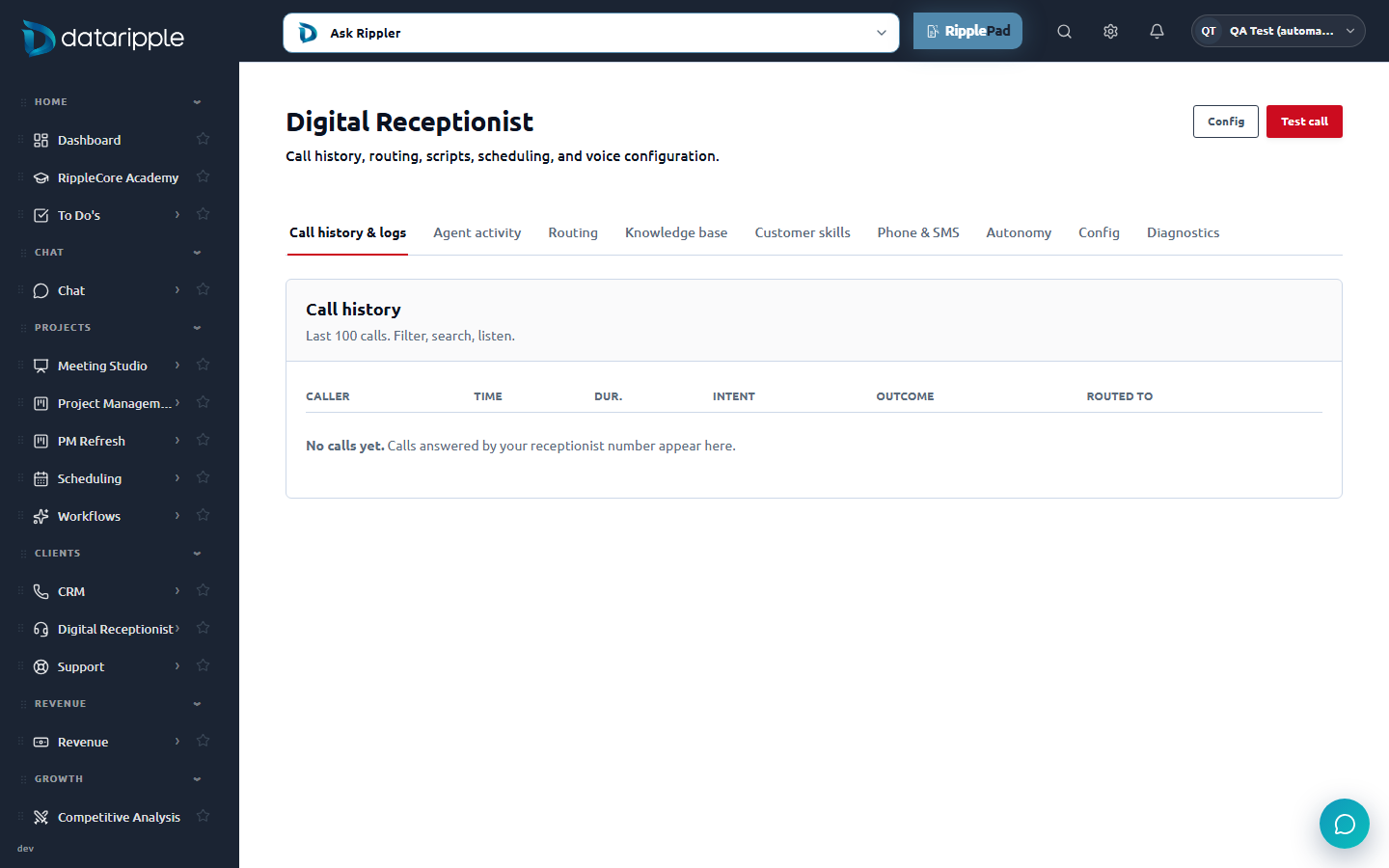
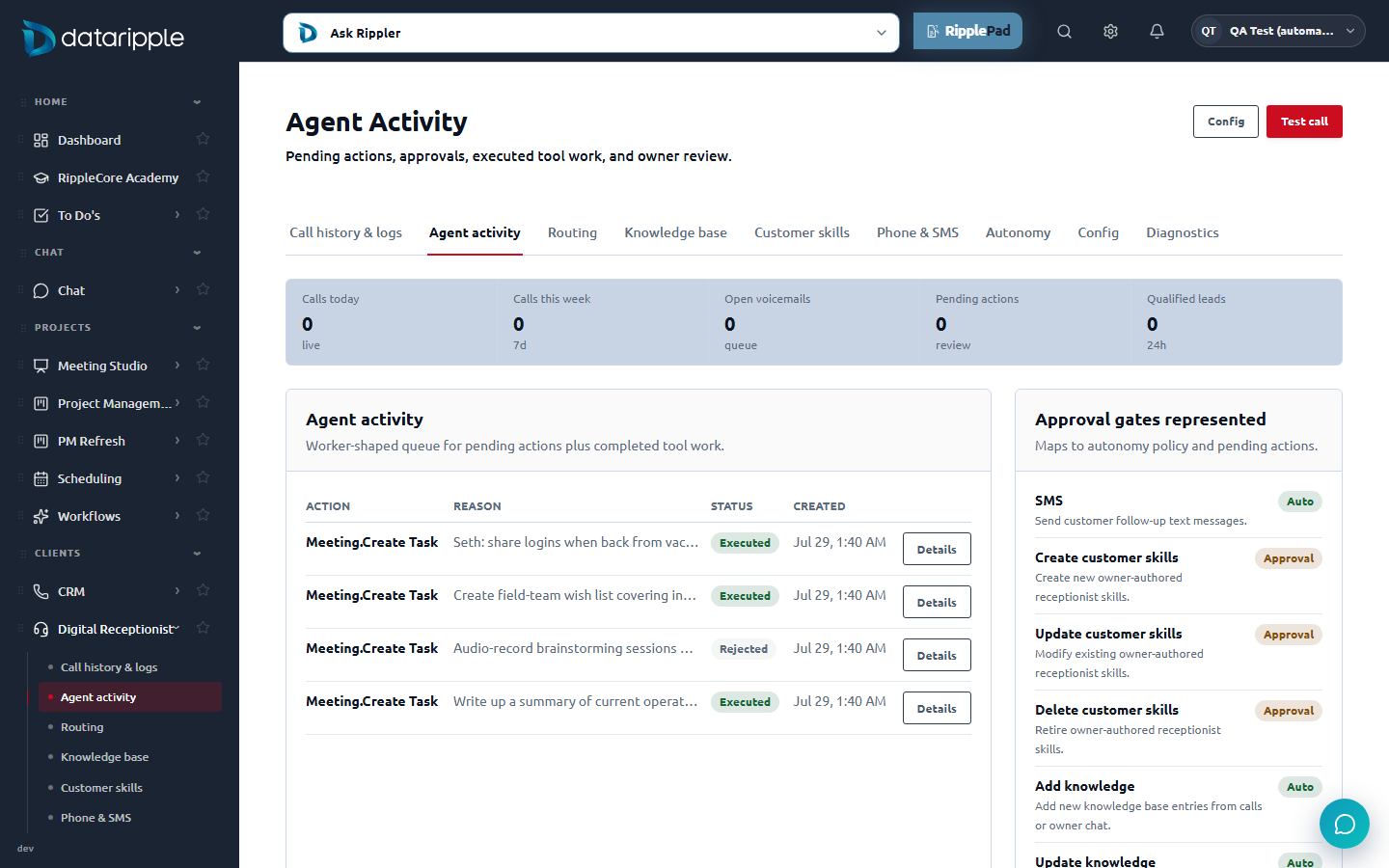
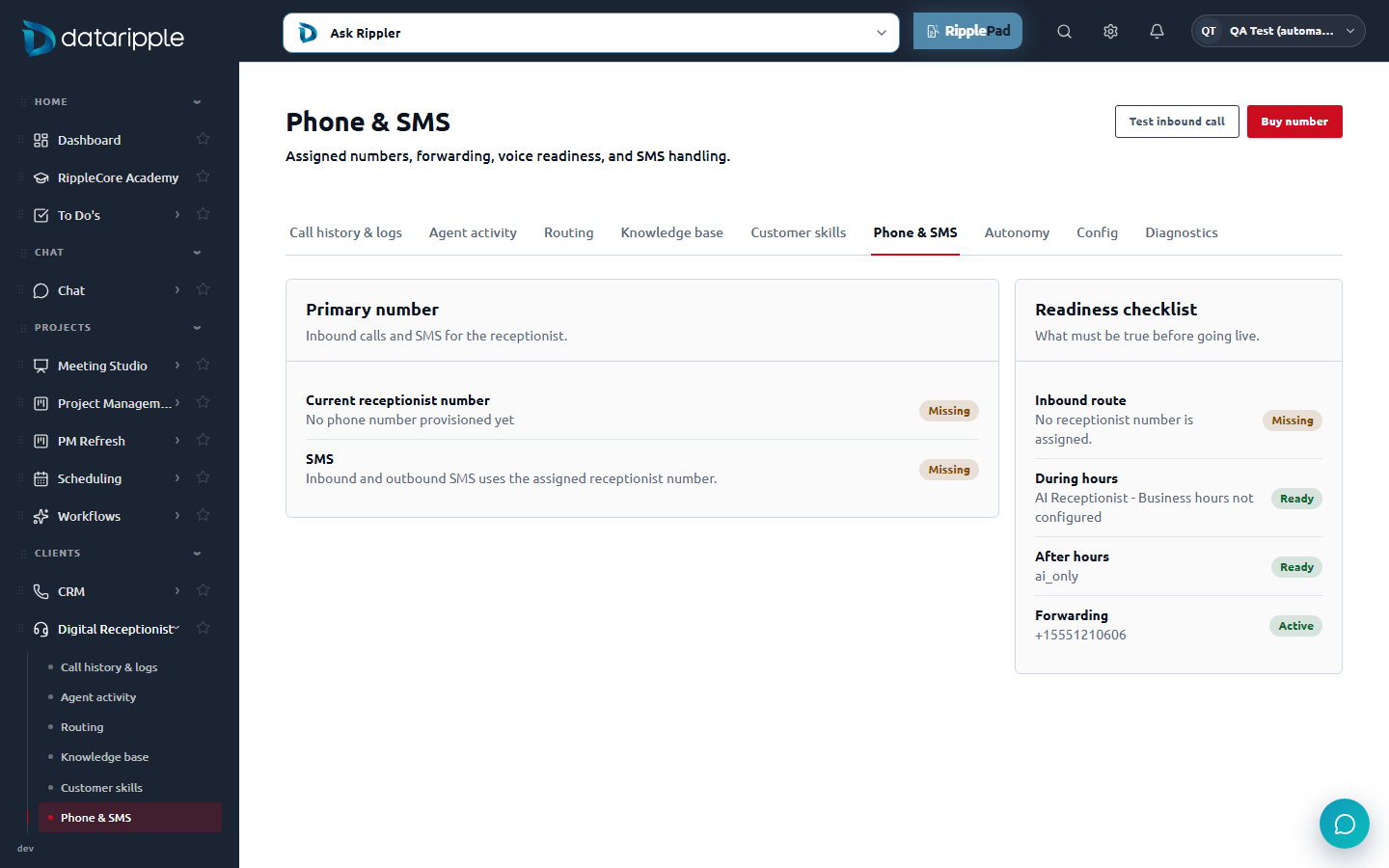
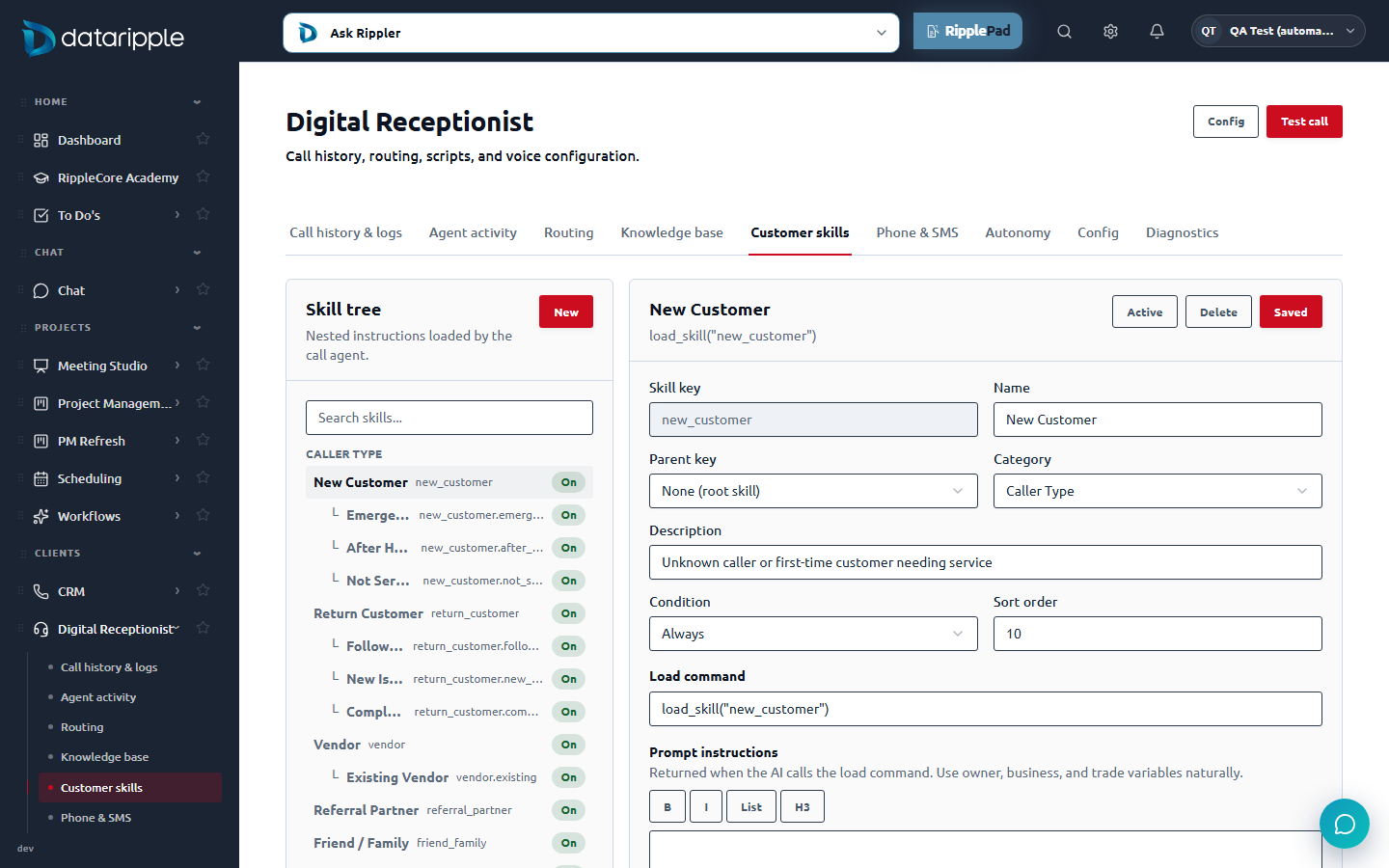
load_skill("new_customer") and a prompt editor with B / I / List / H3. A developer surface shown to an owner.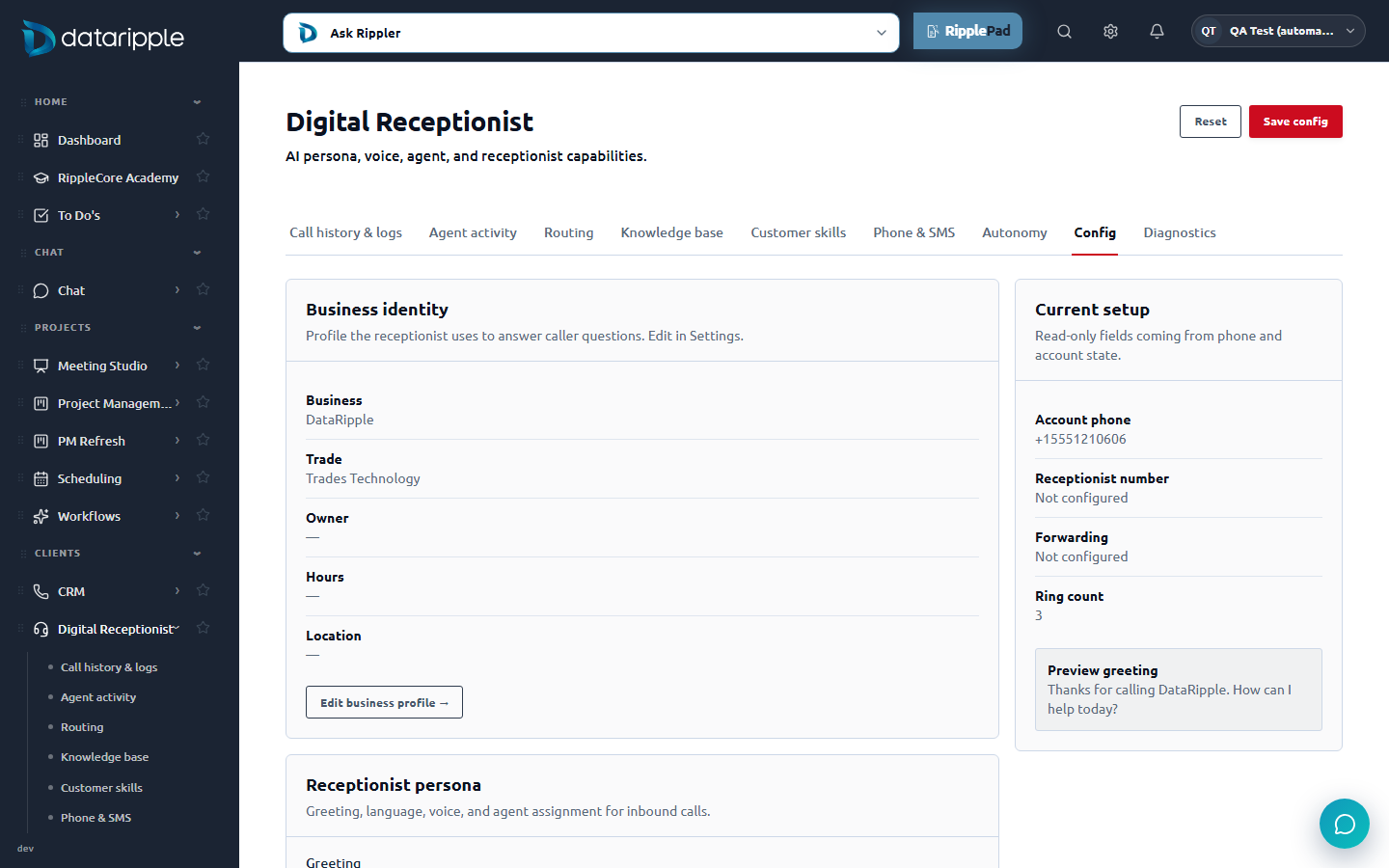
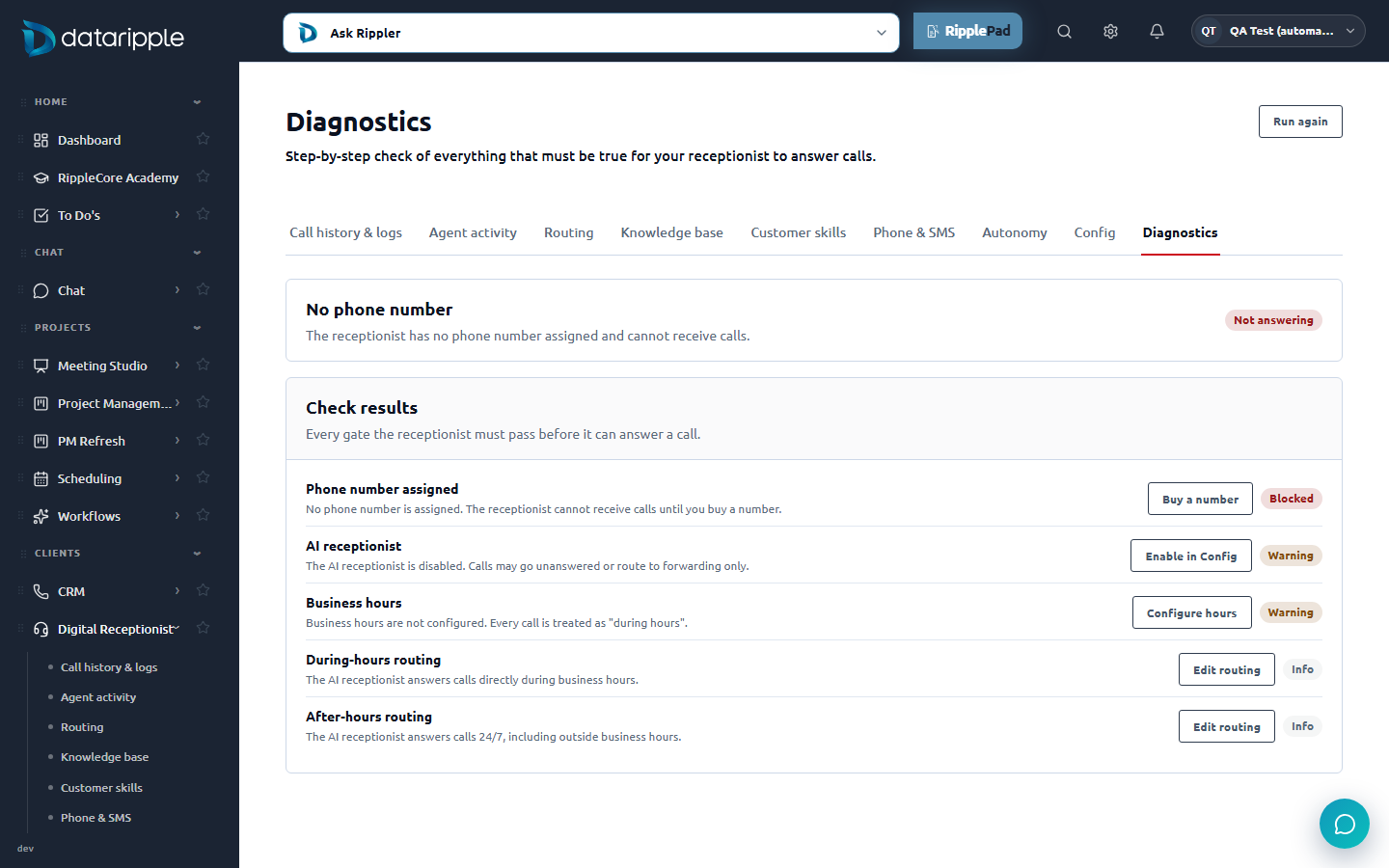
defaultFollowUpStart), creating an appointment nobody agreed to./phone/diagnostics returns Answering / Issues / Not answering) but only the Diagnostics tab shows it. Home, history and every other page are silent, even when the number is missing.elevenlabs.ts); the editor does not warn when you save a draft or an empty body (documented in the business rules). Nothing shows what callers asked that she could not answer, although the store already has an "unanswered" status.Everyone sends a summary. Nobody keeps score of what the AI promised.
Two families sell this to contractors: standalone AI receptionists (Smith.ai, Ruby, Goodcall, Rosie, Dialzara) and the field-service platforms that bolted one on (Housecall Pro CSR AI, ServiceTitan AI Voice Agent, Jobber AI Receptionist). Their post-call experience is remarkably uniform.
Instant summary to your pocket
Smith.ai sends who called, why, and what the agent did by email, text, Slack or Teams the moment the call ends, and the same in a dashboard. Ruby sends summaries and transcripts (no recording). This is table stakes.
A call record with disposition
Smith.ai's call detail: contact, status, time, priority, disposition, actions taken, recording, follow-up message, the summary, and "decisions made by the receptionist". Close to a slip, but a read-only one: nothing tracks whether a human then did anything.
Book, qualify, route emergencies
Goodcall, Rosie and Dialzara all answer 24/7, qualify the job, route emergencies to the right tech and log to the CRM. Housecall Pro CSR AI adds hours, tone, scripts, pricing guidance and booking rules, and "alerts your team when intervention is needed".
Analytics for Friday
Call volumes, call makeup, lead conversion. Useful once a week, useless at 1 PM between jobs. MJ's admin-reskin rule applies: one quiet stat strip, never a wall of tiles.
Hybrid human fallback
Smith.ai pairs the AI with live North American agents for the hard calls. RippleCore's equivalent is the on-call tech and the office manager: the redo makes "hand to a person" a first-class button on every slip.
Setup is still a settings tree
Every product hides hours, greeting, transfer rules and knowledge under a settings area with plain names. None puts webhooks next to calls. Today's nine-tab strip is the outlier.
The gap nobody fills: every product shows what was said (transcript, summary). None shows what the AI committed you to ("someone will call within the hour", "Consumers Energy gives $300 back", "Tyler will be there by 8") as its own list with a clock and a kept/overdue state. None closes the loop from "she could not answer that" to "here is the approved answer, and here is the next call where she used it". None makes a human the only thing that can mark a call done. Those three are the redo's upgrades.
Three front-office lenses, two rounds, one spine
Three role-based AI reviewers, briefed on the real feature, the rejected attempt and my three directions, answered nine questions each before I built anything, then reviewed the built screens. They converged without seeing each other's answers.
"Never make the boss do the assistant's job."
Model: the EA who runs a CEO's day. First-screen order: is the phone answered, who needs me and how fast, what did she say in my name, what got handled without me, what could she not answer. "How many leads is a Friday question."
A promise ledger with a running clock is the single most reassuring number a small-business owner could be handed about an AI answering their phone. It converts the scariest objection ("what if it says something I did not authorize") into the product's proudest screen.
"The caller never calls twice. The boss never asks what happened."
Model: twenty years on a contractor's main line with the carbon-copy message book. Twelve reasons people call, what "handled" means for each, and the callback discipline: every open slip has one named owner and a due time, "left a message" is not closed, a second call from the same number escalates.
Do not mark a call handled because the AI finished talking. Handled means a human obligation is closed. Do not let an item exist with no owner and no due time. That is the crack everything falls through.
"Anyone speaking for the principal is on the record."
Model: the briefing-book lead. BLUF first, then decisions needed, then "on the record" with the source of authority for each statement, then questions without cleared answers, then handled, collapsed. An approval card shows the exact outgoing text verbatim, the recipient, the reason, and what happens if you do nothing.
Products ship transcripts and summaries, which are the same thing at different lengths. What the owner needs is the read-out: here is what you are now on the hook for, each line clickable to the second in the recording where it was said.
Unanimous: the slip is the unit, A is the spine
All three kept direction A (the message slip), merged B (the brief) into a three-sentence band on top, and took only the status strip from C, killing the kanban ("four judgments before the first action").
Unanimous: what the rejected attempt got wrong
It taught a process before it did a favor (four invented workspaces, a four-step progress line); the hero card made one caller the whole screen; "Where did everything go?" admitted the vocabulary was new. And nothing said whether the receptionist was on.
Round two: on the built screens
All three read the finished pages (as a first-time owner, a day-one hire, and a briefing lead). Verdicts: "ship the hybrid direction" (EA), "close, but not yet" (secretary), "the instrument is right, not yet on the record" (chief of staff). Their fixes are applied below.
What round two changed, and why
A slip that knows the rest of the business, and a receptionist who keeps score of her own promises
Standalone receptionists produce a slip in a vacuum. RippleCore's sits next to the CRM, the projects, the calendar and the team, so the slip can say "Greg Thornton, open project: Thornton bath remodel, Mike is on it Friday" instead of "unknown caller, tile question". That, plus two accountability loops no competitor ships:
Loop 1: the promise ledger
After every call, the commitments she spoke are extracted into their own lines ("someone will call within the hour", "$300 rebate", "Tyler within 15 minutes") with a due time, a kept / overdue state, and a "hear it" link to the second in the recording. Only a person marks one kept. At week end: "12 promises made in your name, 10 kept".
New backend: extraction + a commitments tableLoop 2: questions she could not answer
"Do you service Lowell?" shows up on the home with her drafted answer. One click publishes it into What she knows with a "published by Dan, Sep 15" stamp, and the next call's slip reads "answered from your approved answer, Sep 15".
Half exists: the knowledge store already has an unanswered status and a source call idLoop 3: a human closes
Bella may set Booked, Handled and Spam on her own. She never sets Done. Done is a person saying "I reached them", stamped with who and when. "Left a message" keeps the slip open and brings it back tomorrow.
New backend: a follow-up state on each callWhere the nine tabs went. Nothing was removed. Two became daily views, seven moved behind one Settings door with a plain name each and a "Was: …" note so nobody has to search for the old one.
| Today's tab | Now called | Where | What changed |
|---|---|---|---|
| Call history & logs | Today and All calls | Home · All calls | Rows became slips with a state, an owner and a promise. Search and filters added. Every row opens the slip with the recording. |
| Agent activity | Waiting on your OK | Waiting on your OK, and inline on Today | Pending items show the exact change verbatim and "if you do nothing, nothing changes". The activity feed is filtered to receptionist actions and reads "Everything she did", each with who decided and when. |
| Routing | Who answers when | Settings | Same two windows, same hours builder. "Forward first, AI backup" reads "Ring my phone first, Bella backs up". |
| Knowledge base | What she knows | Settings | Same articles. Drafts are labelled "not used on calls". New: "used N times" and the questions-she-could-not-answer list on top. |
| Customer skills | How she handles calls | Settings | Plain names first, the key as a small grey label. Skill key, parent, sort order and load command sit under Advanced in the editor. |
| Phone & SMS | Your number | Settings | Same lifecycle. 10DLC reads "Text messaging registration"; webhooks read "Phone company connection". Forms appear only while a step is incomplete. |
| Autonomy | What she can do without asking | Settings | Same eight switches and the text limit. Each reads "Automatic" or "Asks first". |
| Config | Greeting and voice | Settings | Her name is a field. "ElevenLabs agent" moves under Advanced. Capability switches read as things she is allowed to do on a call. |
| Diagnostics | Is she working? | Settings, and the status line on every page | Same checks and fix buttons. The overall answer is now the first line of every receptionist page. |
One recommended home, three alternatives, one shared everything-else
All four share the same sample day (Brightwater Plumbing & Heating, 10 calls, two overdue promises, one unanswered question, one approval, one live call), the same opened-message drawer, the same All calls, Waiting on your OK and Settings. Only the home layout differs, so the comparison is fair. Everything that reads as a number or a row opens the record behind it. Real vs sample: caller, number, city, duration, summary, intent, urgency, outcome, recording, transcript, contact link, approvals, policy switches, checks, knowledge, skills, routing, greeting and voice all exist in the worker today. The state / owner / done, the promise line, "said on the record" with its source, the drafted answer and the "used N times" count are sample, labelled "New" in the drawer while Review notes is on (the toggle in the review bar; off shows what a customer would see).
Recommended: the hybrid home
Status line (from C) → the brief, addressed and timed, naming the worst caller first (from B) → anything waiting on your OK → the messages, worst first, each with an owner and a due time (A) → the promise ledger → the question she could not answer → handled without you, collapsed → this week so far.
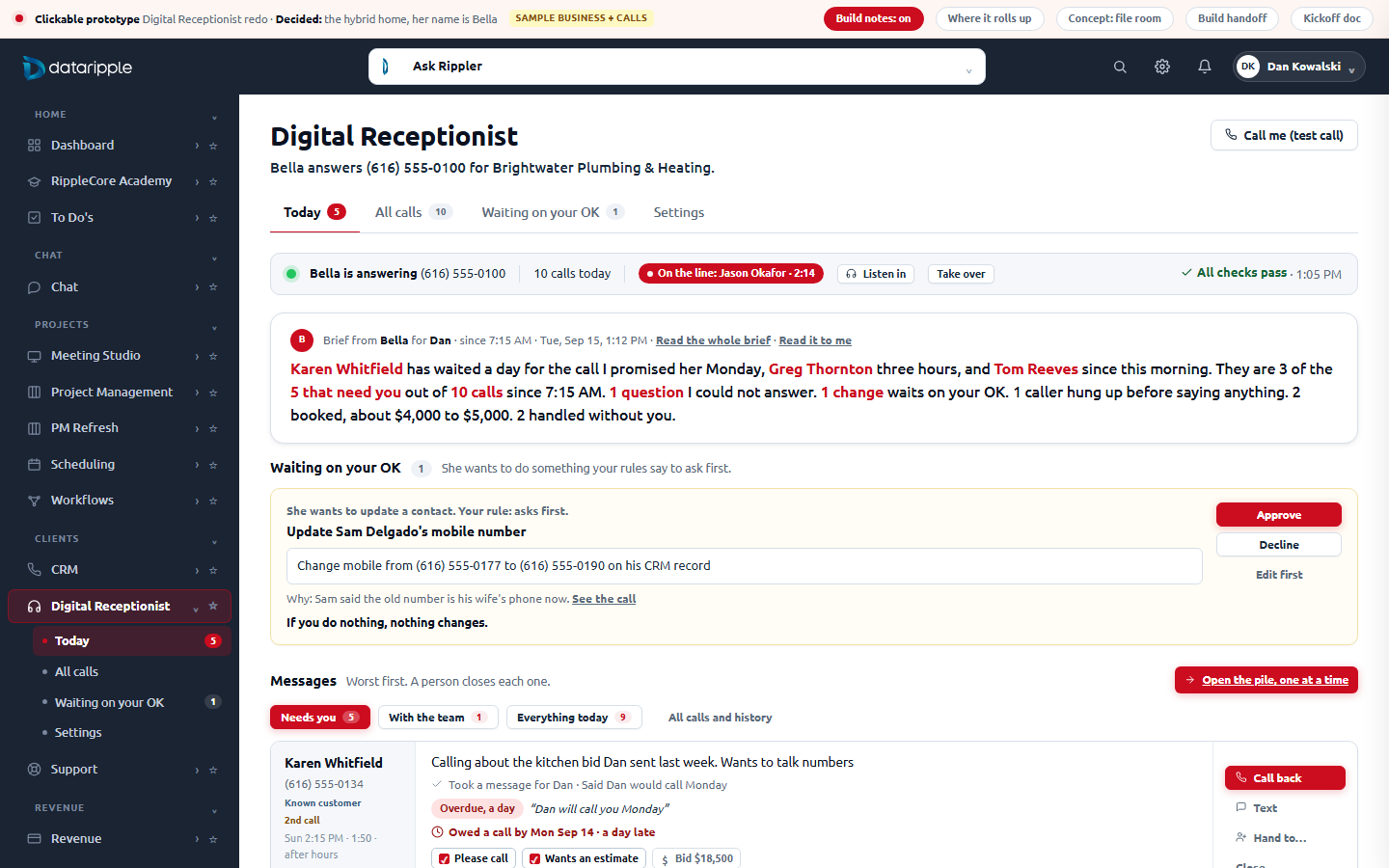
A slip, opened
The message on top, then what she promised with a clock and "jump to where she said it", what she did, what she said on the record, the recording and transcript with the commitment highlighted, the details she captured, and one row of actions with one obvious default.
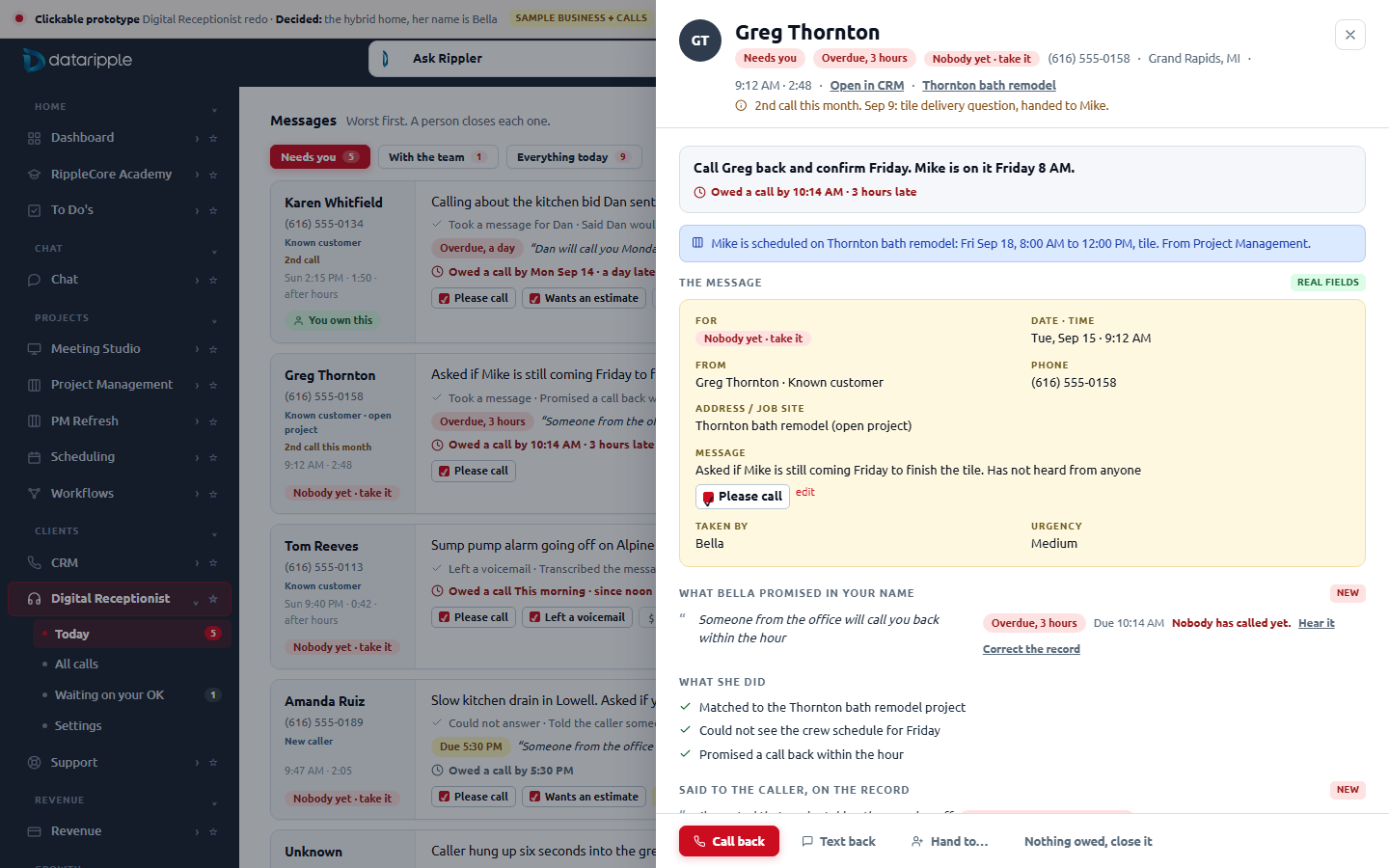
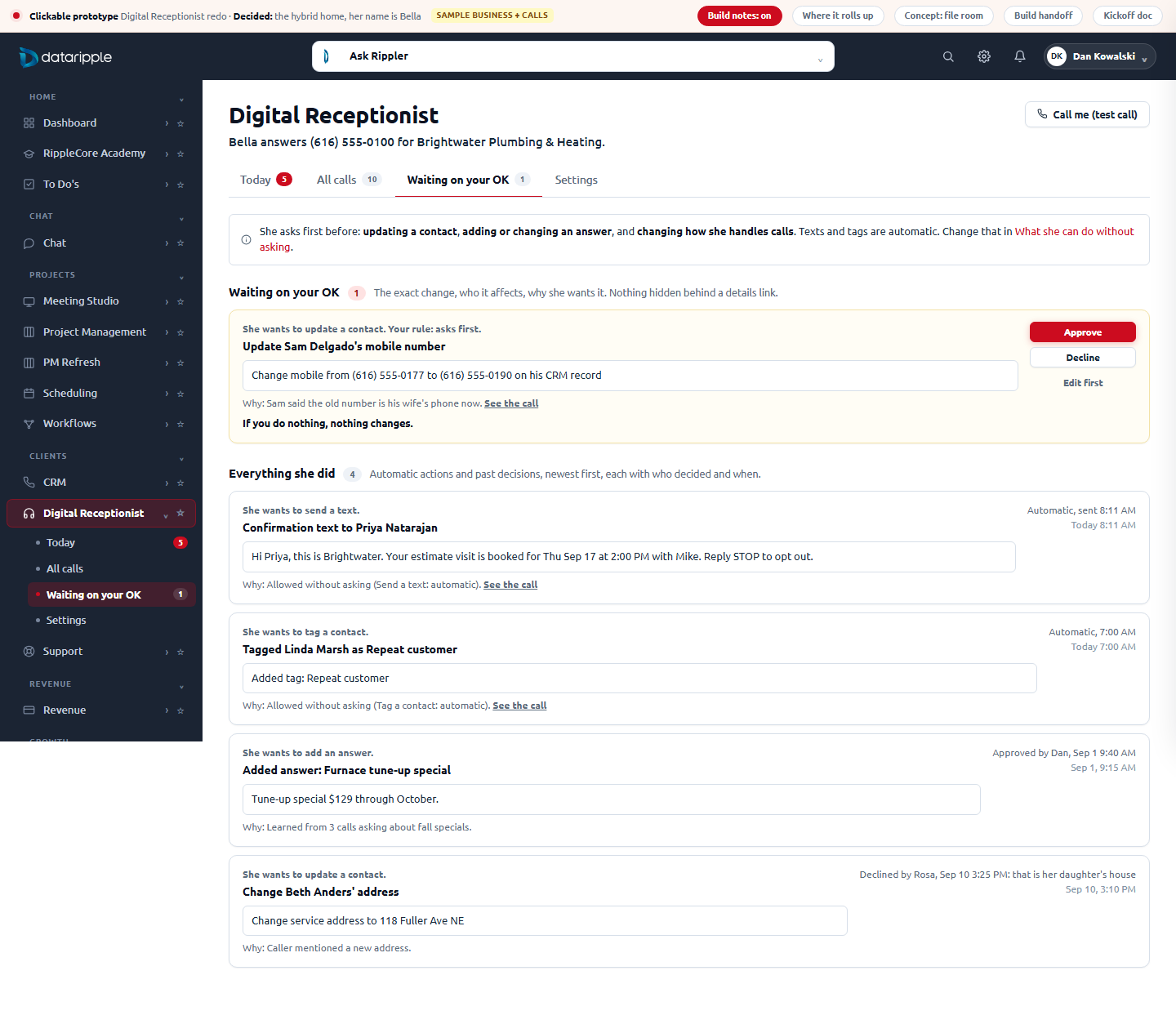
Waiting on your OK
The exact change, verbatim, who it affects, why she wants it, and "if you do nothing, nothing changes". Approve / Decline / Edit first. Below it, everything she did, including the automatic actions, each stamped with who decided and when, so the switch settings are visible in practice.
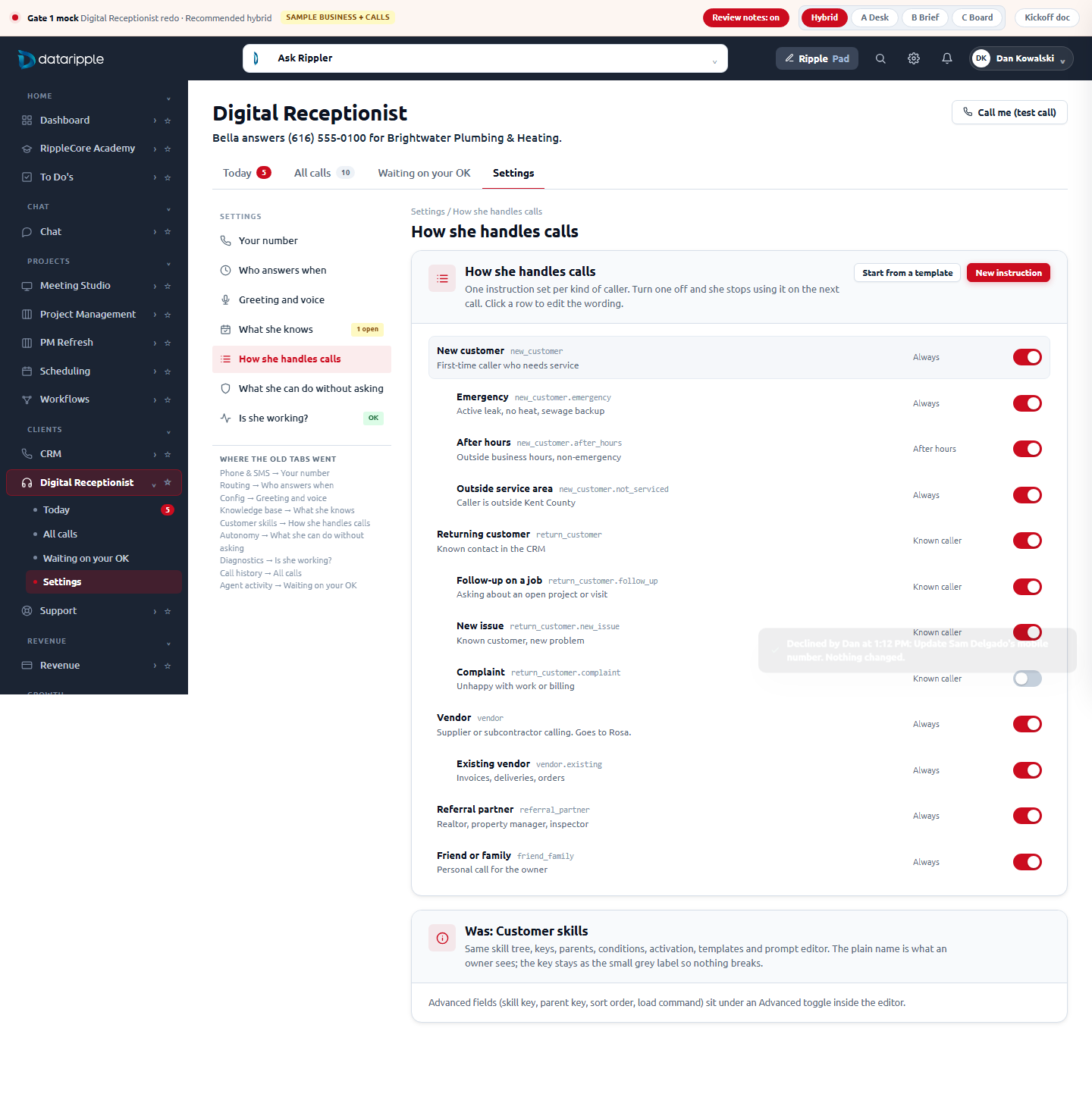
The Settings door
Seven sections in the v3 Settings grammar (rail on the left, titled cards). Each carries a "Was:" note naming the tab it replaced and listing every control that was kept.
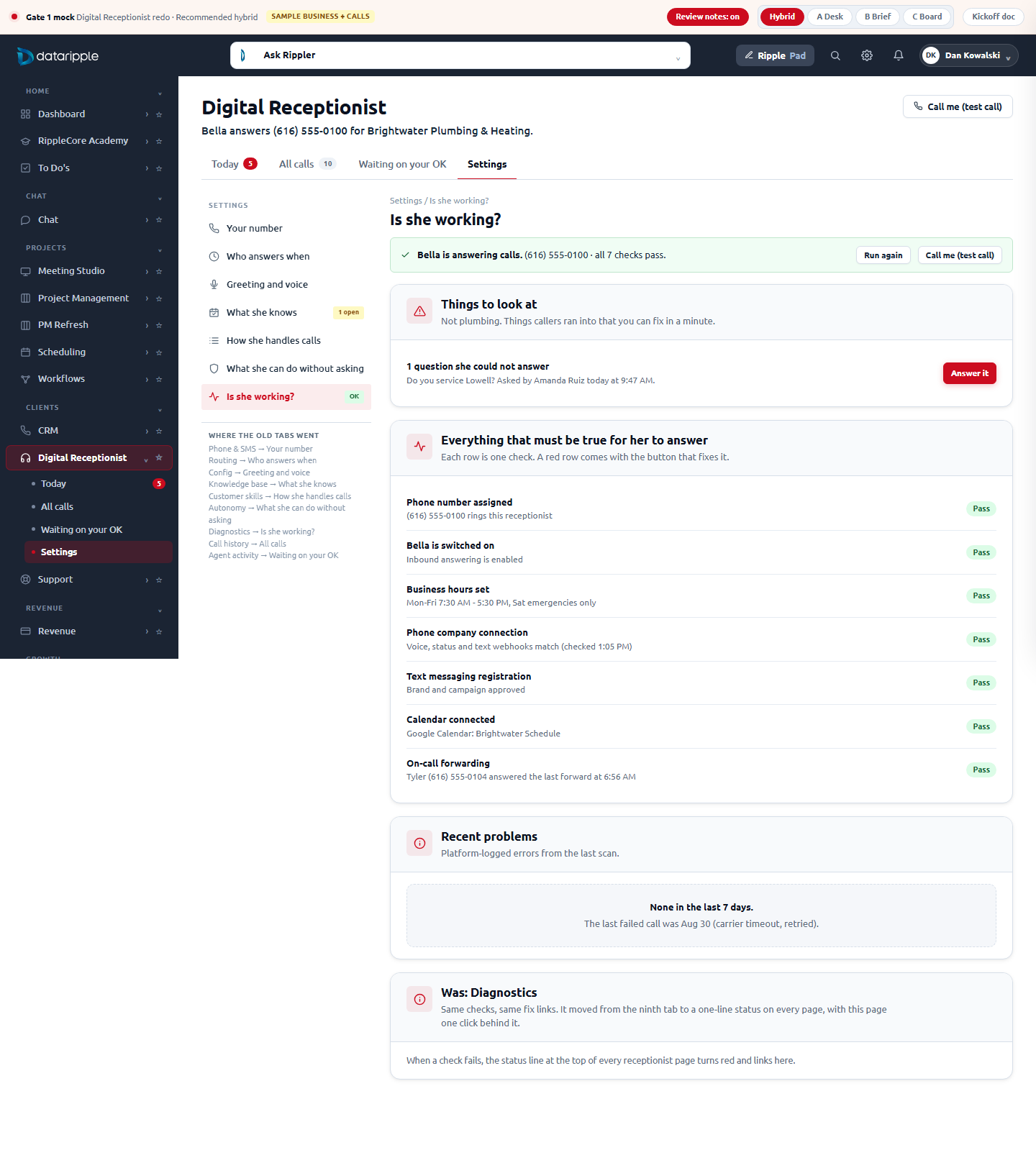
Is she working?
Same checks, same fix buttons, moved from the ninth tab to a green line on every page with this page one click behind it. A failing check turns the line red.
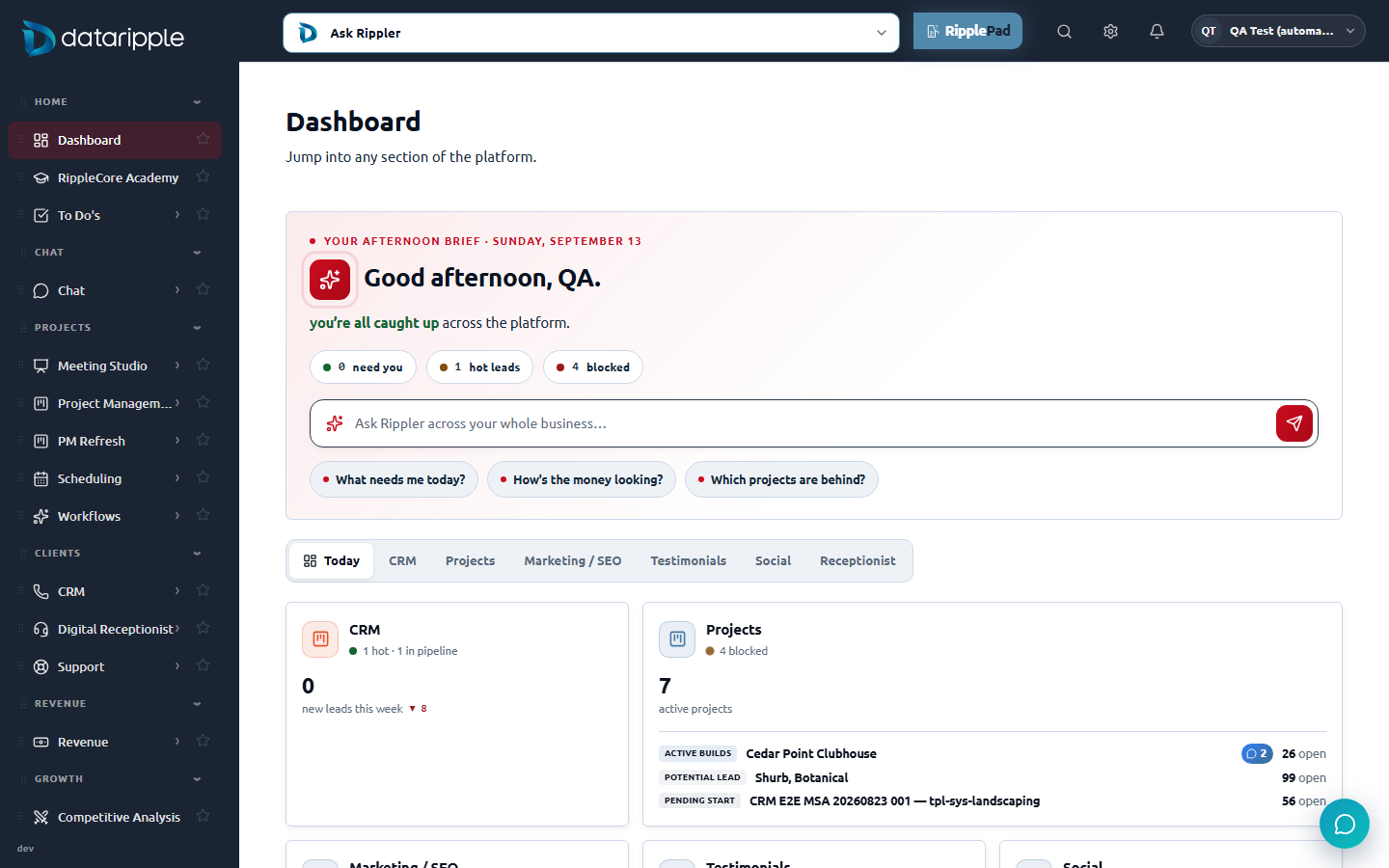
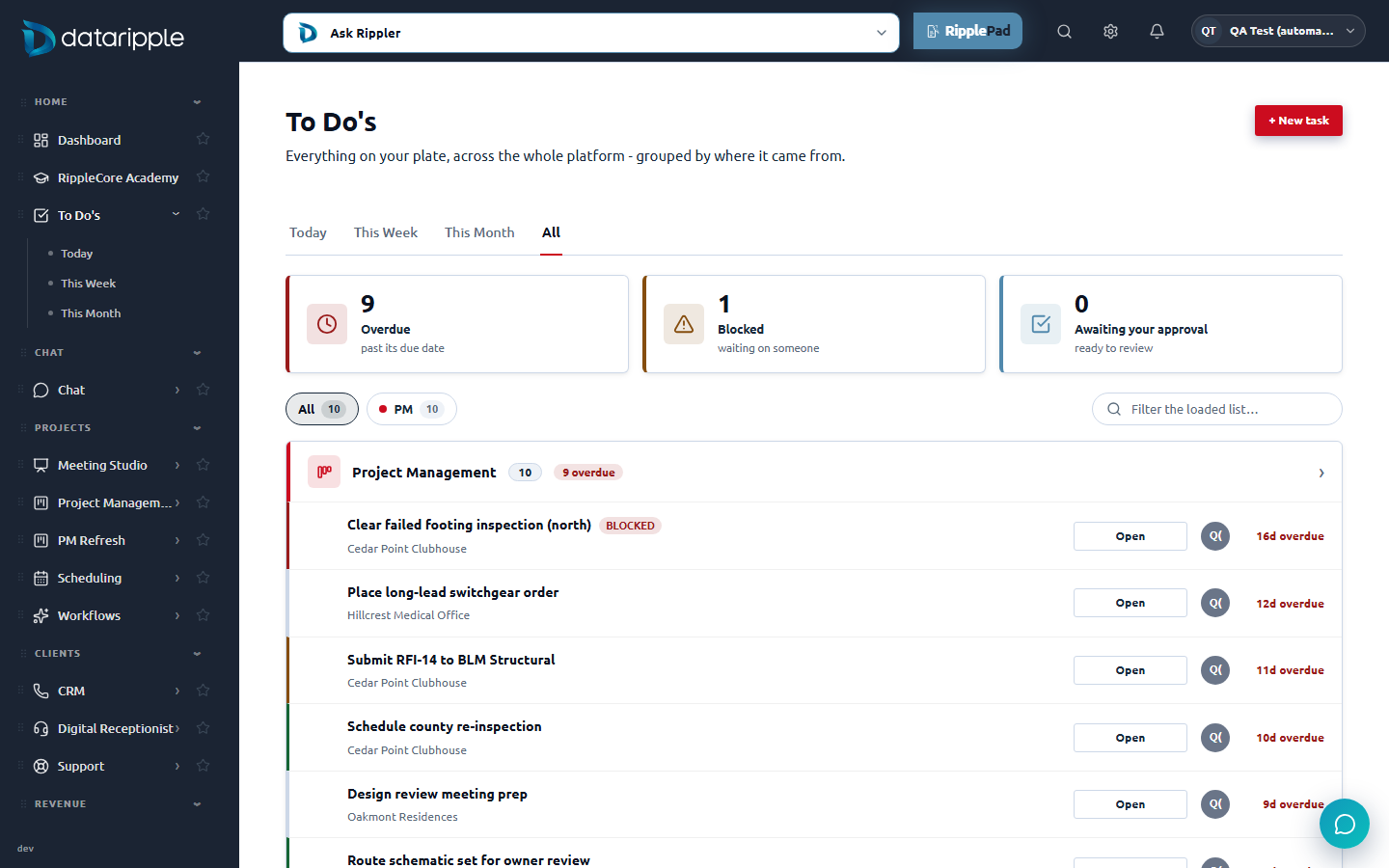
Where it rolls up: To Do's and the RC Dashboard
The live Dashboard already has a Receptionist card and a "Needs you today" list; To Do's already groups by where a task came from. Bella's open messages join both, from the same record that drives Today.
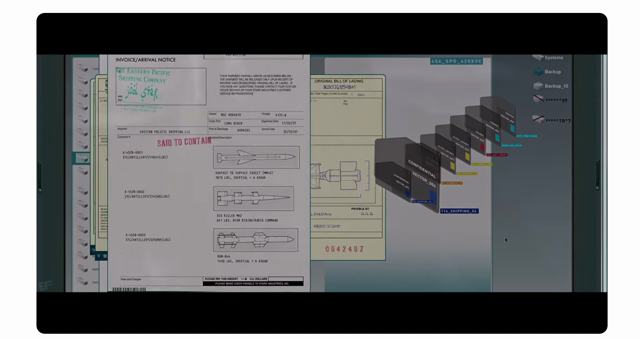
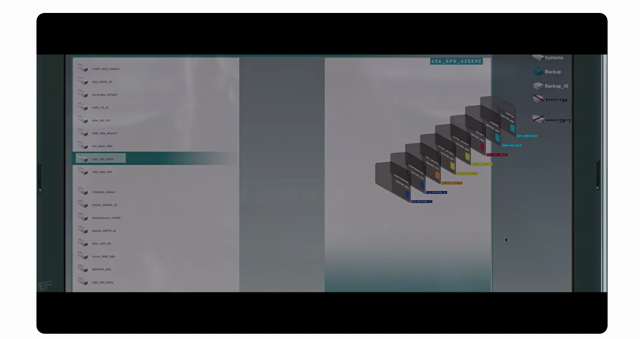
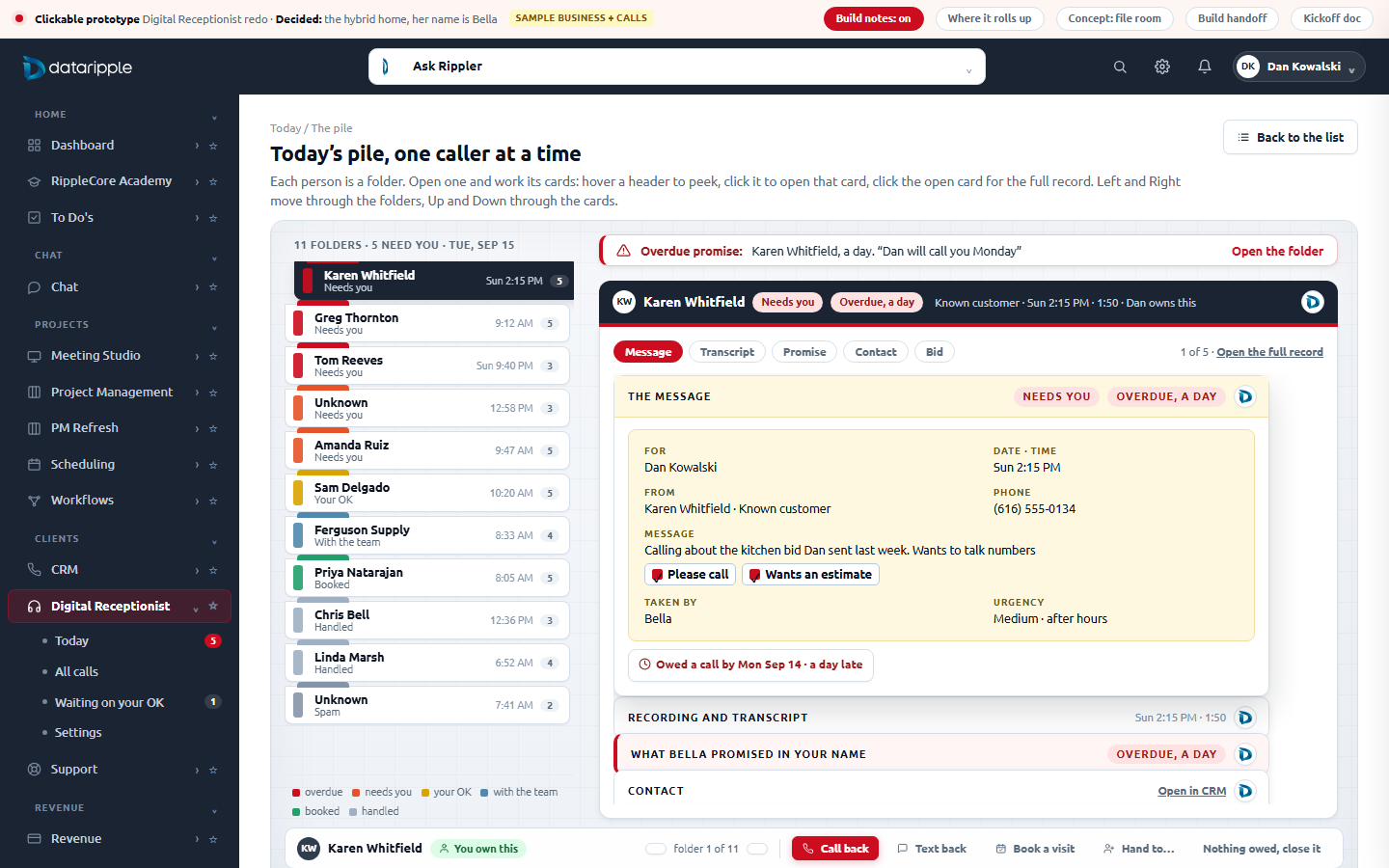
Triage: the pile, one caller at a time, with the caller's real documents (from MJ's Iron Man clip)
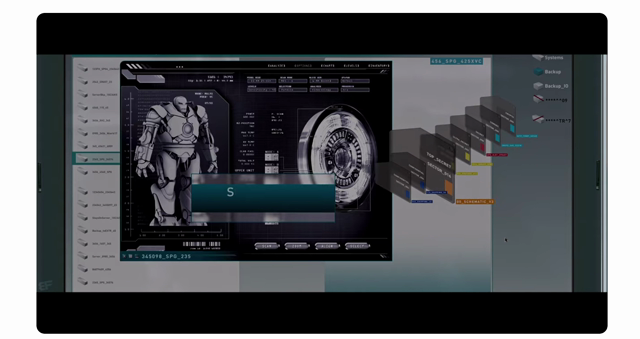
Opening the While You Were Out cards the way Pepper pulls files in Iron Man (2008), restyled in the prototype's own grammar after MJ's review.
The reference scene: a pale steel screen with a file list down the left, a "GHOST DRIVE FOUND" hazard band, a stack of dark folders that materializes on the right, documents that fly out of it one after another and pile up on the desk, and a dark "File Access" panel for the deep view. In Bella's version the people rows are the folders: each row is a folder tab in the caller's state color with a card count. Open one and it opens on the desk with a navy tab (name, state, who owns it, the DataRipple badge) and its cards inside, each keeping its own look: the yellow message slip, the transcript sheet, the red-bordered promise, the contact card, the blue project or bid card, the approval card. The cards stack as header bars; hover a header to peek, click it to open that card in place, click the open card (or press Enter) for the full record in the same message drawer used everywhere else. Left and Right move through the folders, Up and Down through the cards, and the band at the top names the worst overdue promise and opens that folder. It lives inside Today as the second view, not a fifth tab: the List | Triage switch at the top of Messages, or "Start with Karen" at the end of the brief. The list stays the default; Today remembers which view you used last.
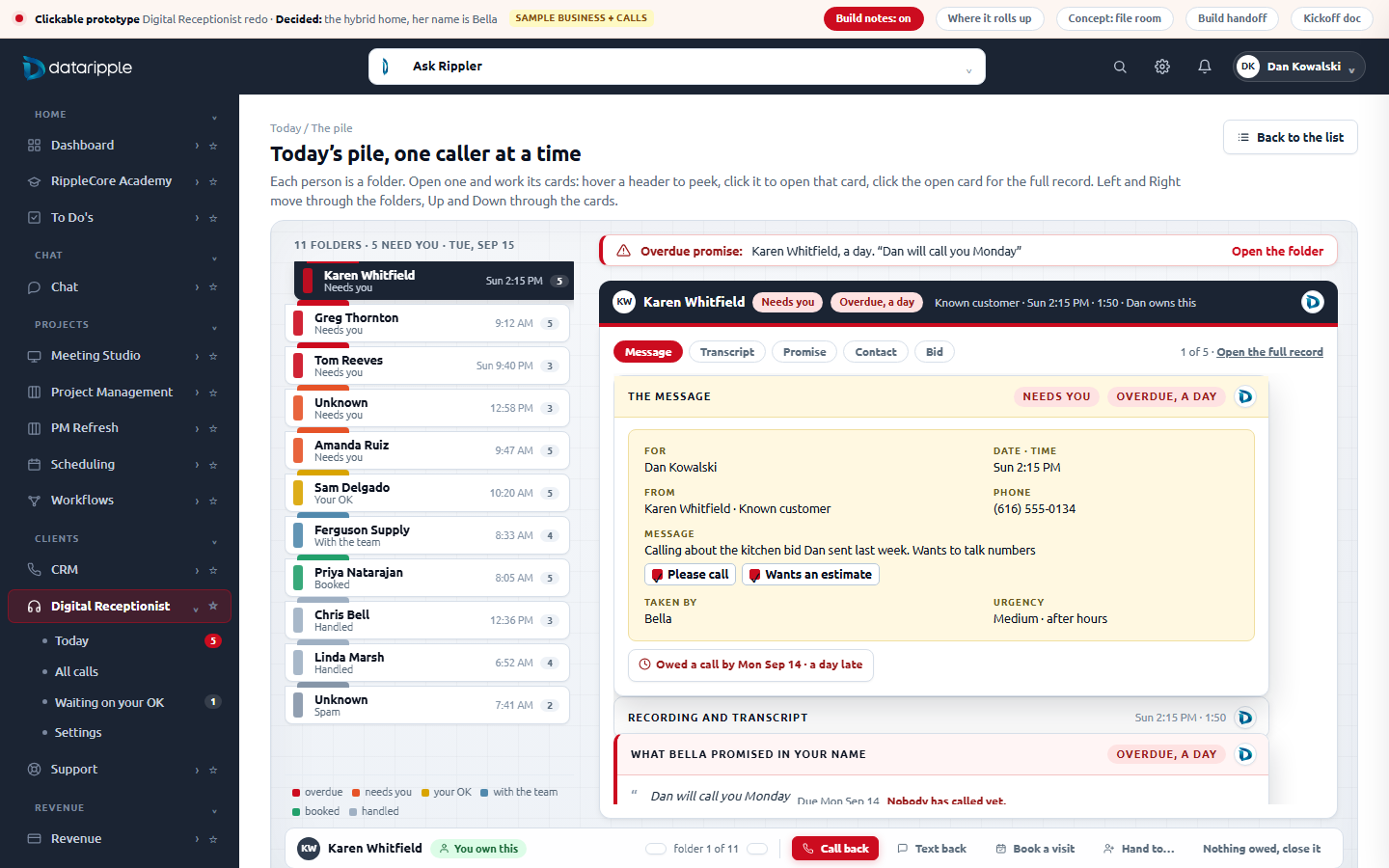
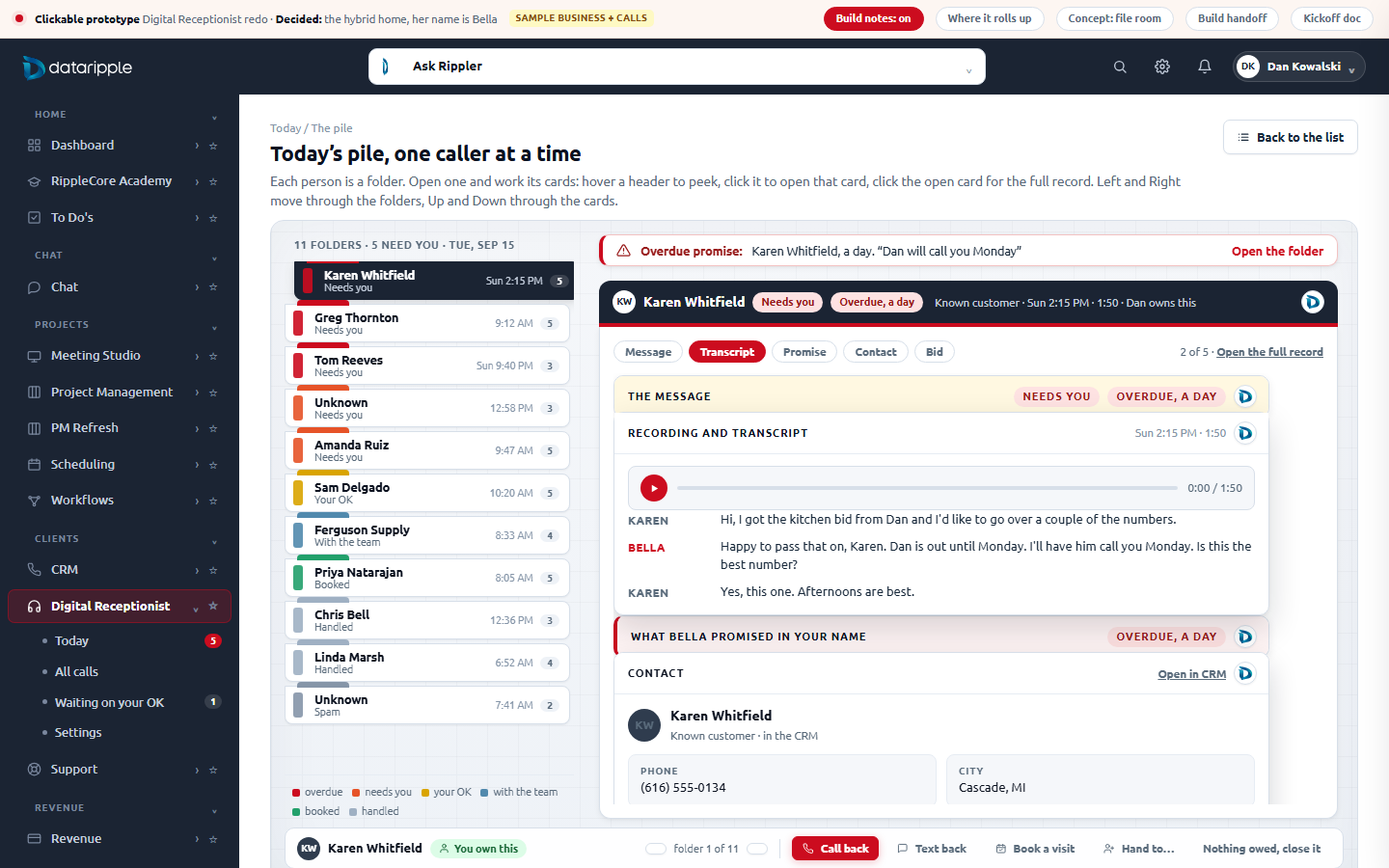
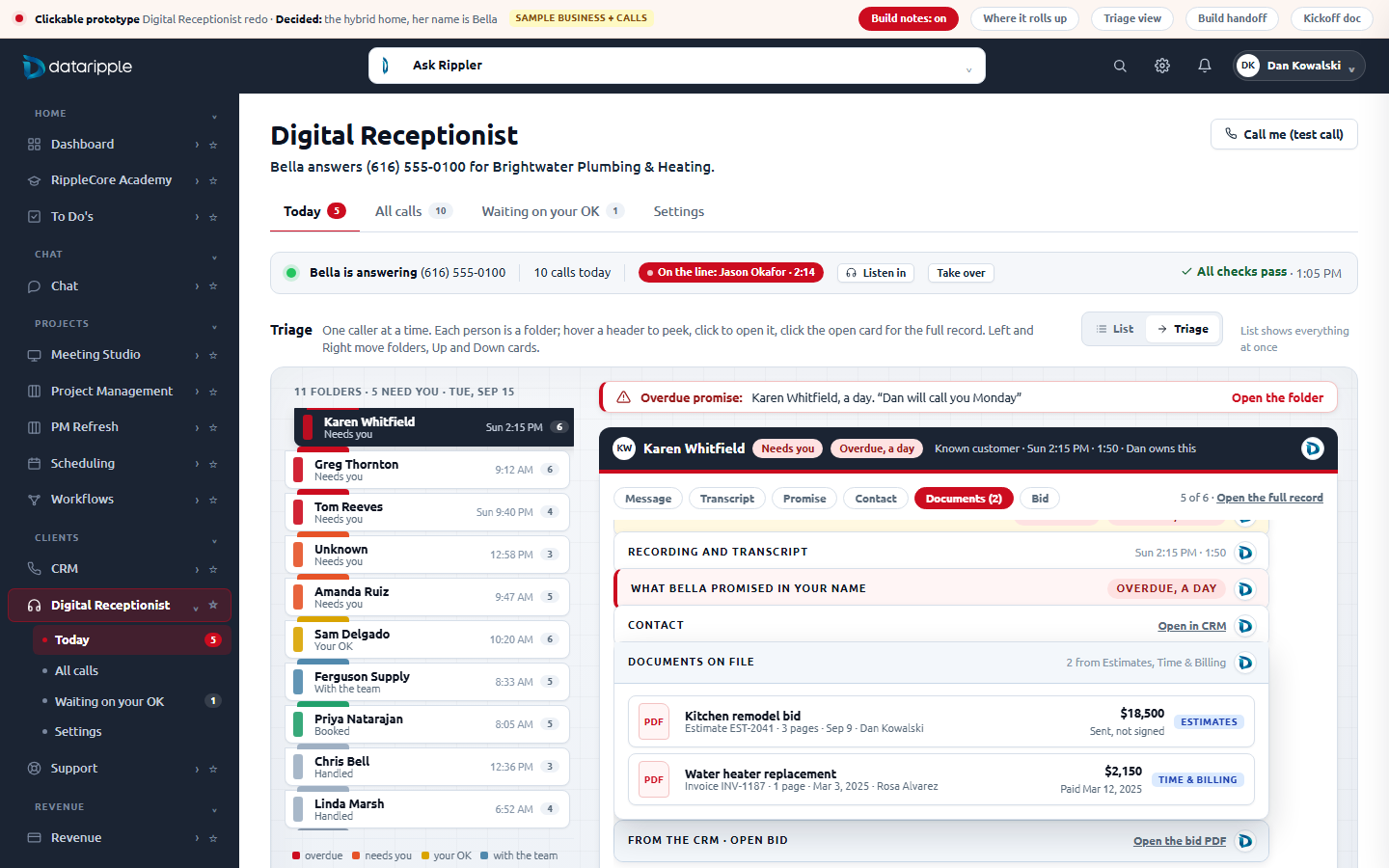
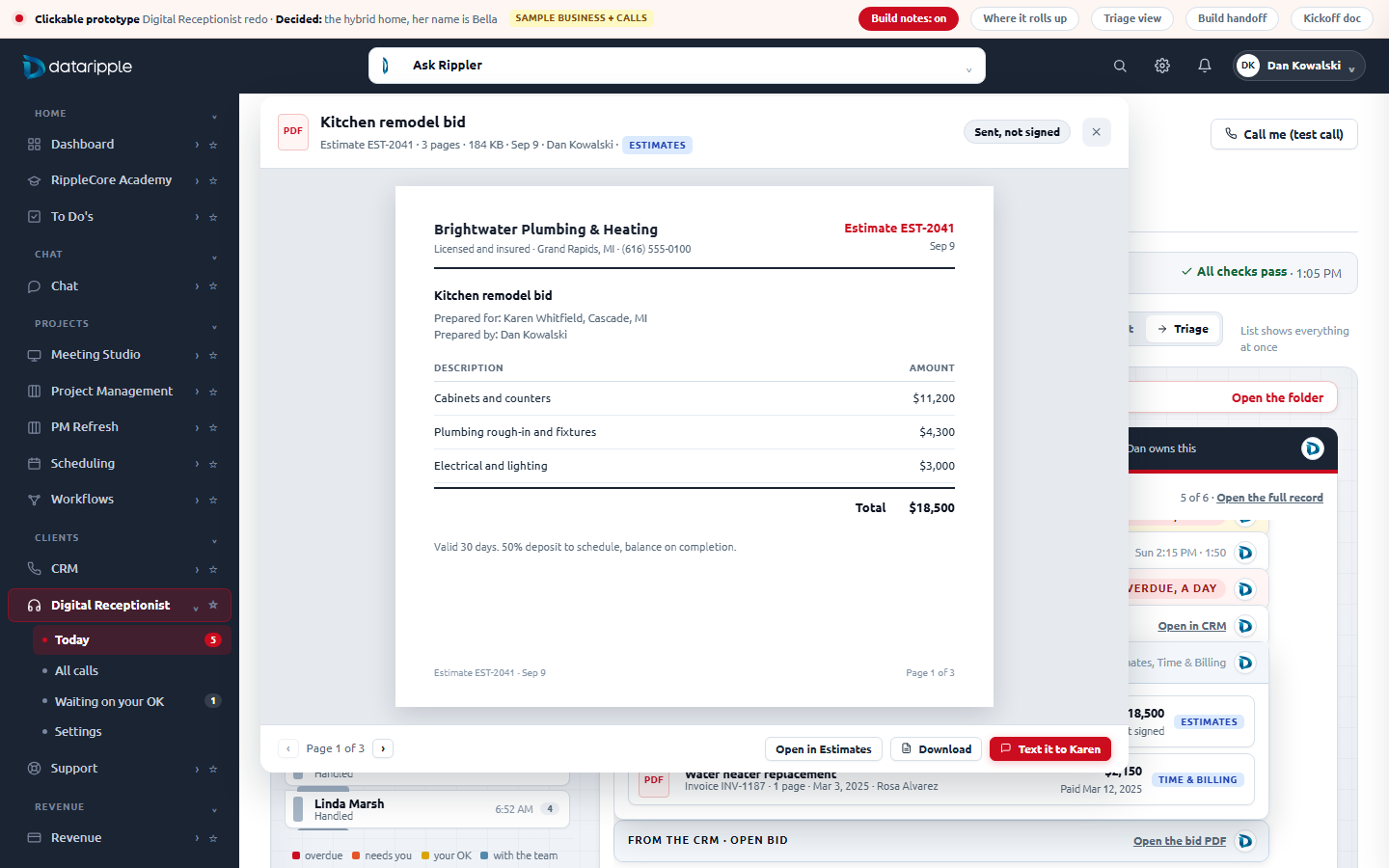
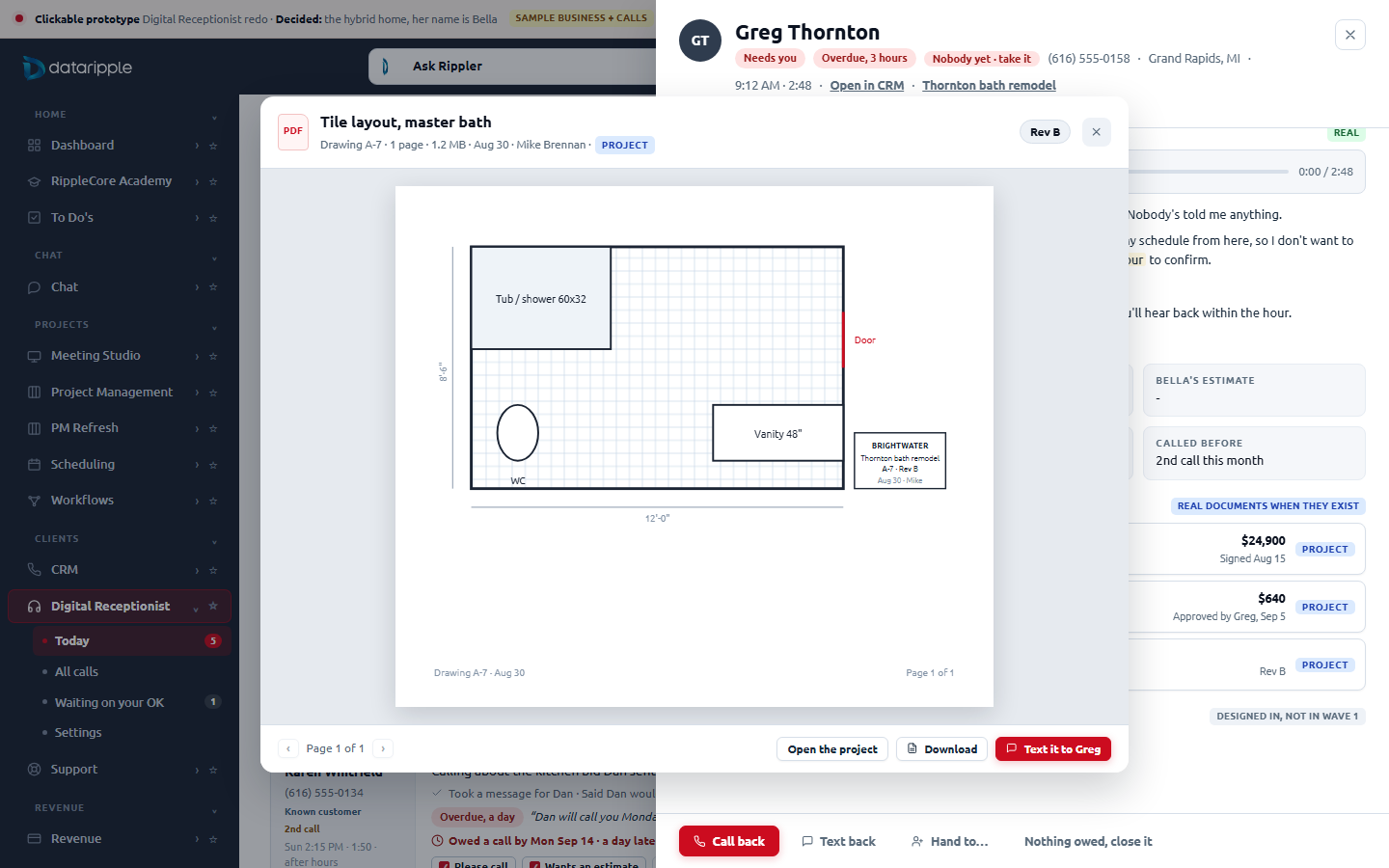
attachments table only allows project, task and note), so the card is one union read over the five places documents already live: Estimates (quotes), Time & Billing (invoices), Contracts (uploaded or generated PDFs), the project's Document Vault and drawings, and Finance vendor bills. Contracts, vault files, drawings, spec books and vendor bills already have stored files and open inline in Wave 1; estimates and invoices have no PDF anywhere in the worker today (by design), so in Wave 1 their rows open the record and Wave 2 renders them with the contract renderer that already exists. One prerequisite surfaced on the way: calls.contact_id exists but nothing writes it, so the phone match at call time is a Wave 1 backend item (handoff 5.1). The prototype's viewer draws sample pages in HTML; the real one shows the stored file.The three alternatives (not chosen)
Distinct directions, not variations. MJ picked the hybrid; these stay for context.
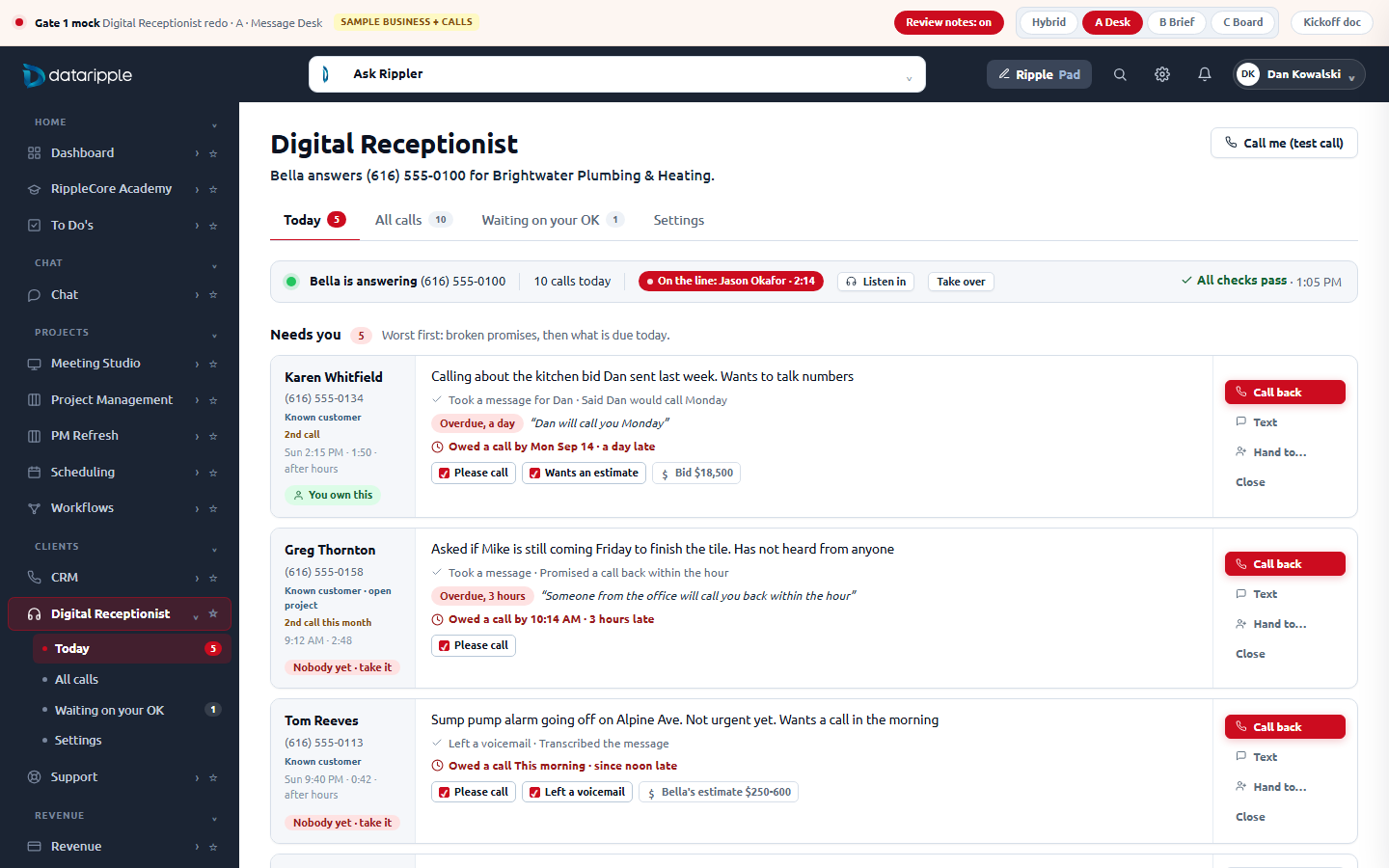
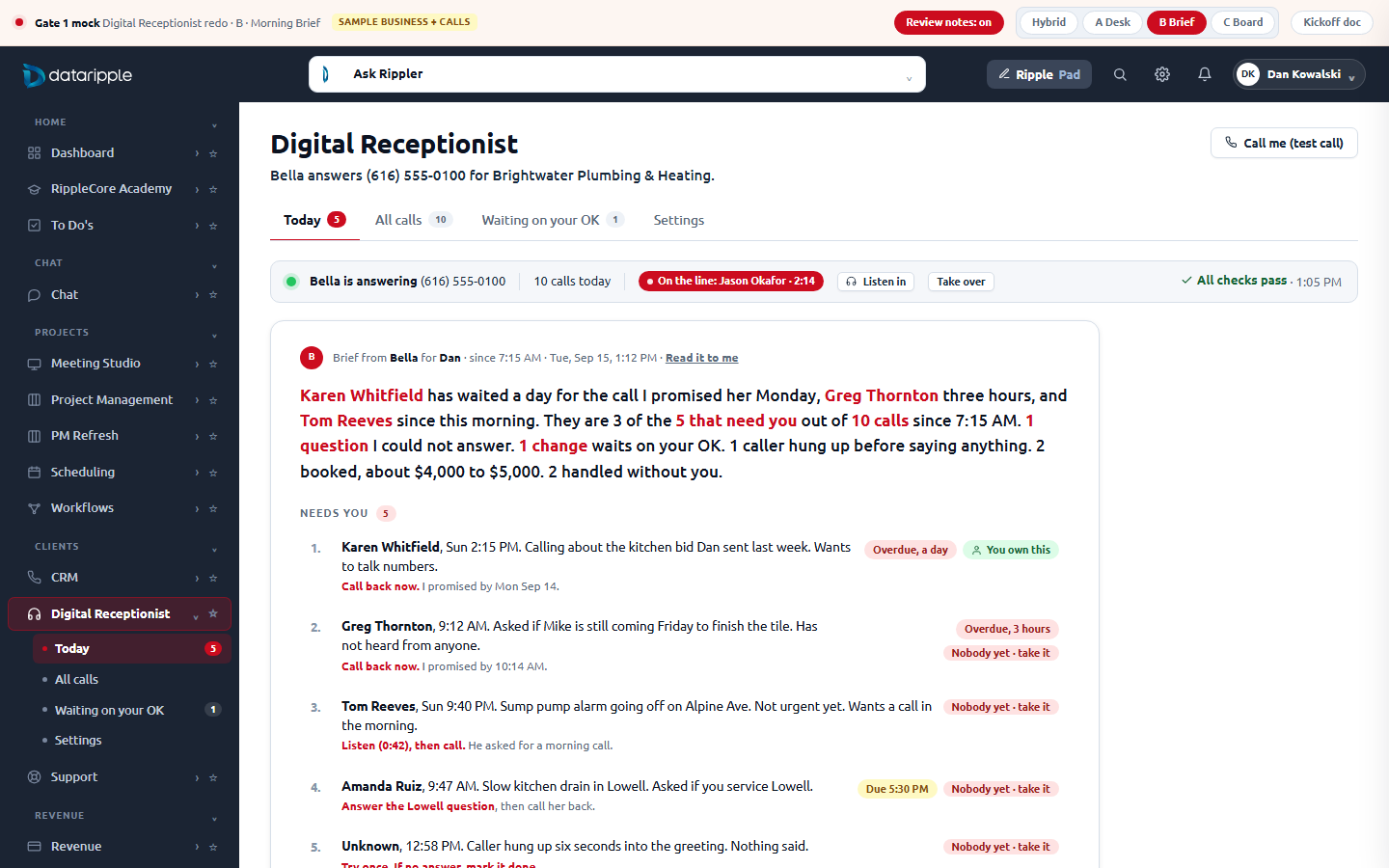
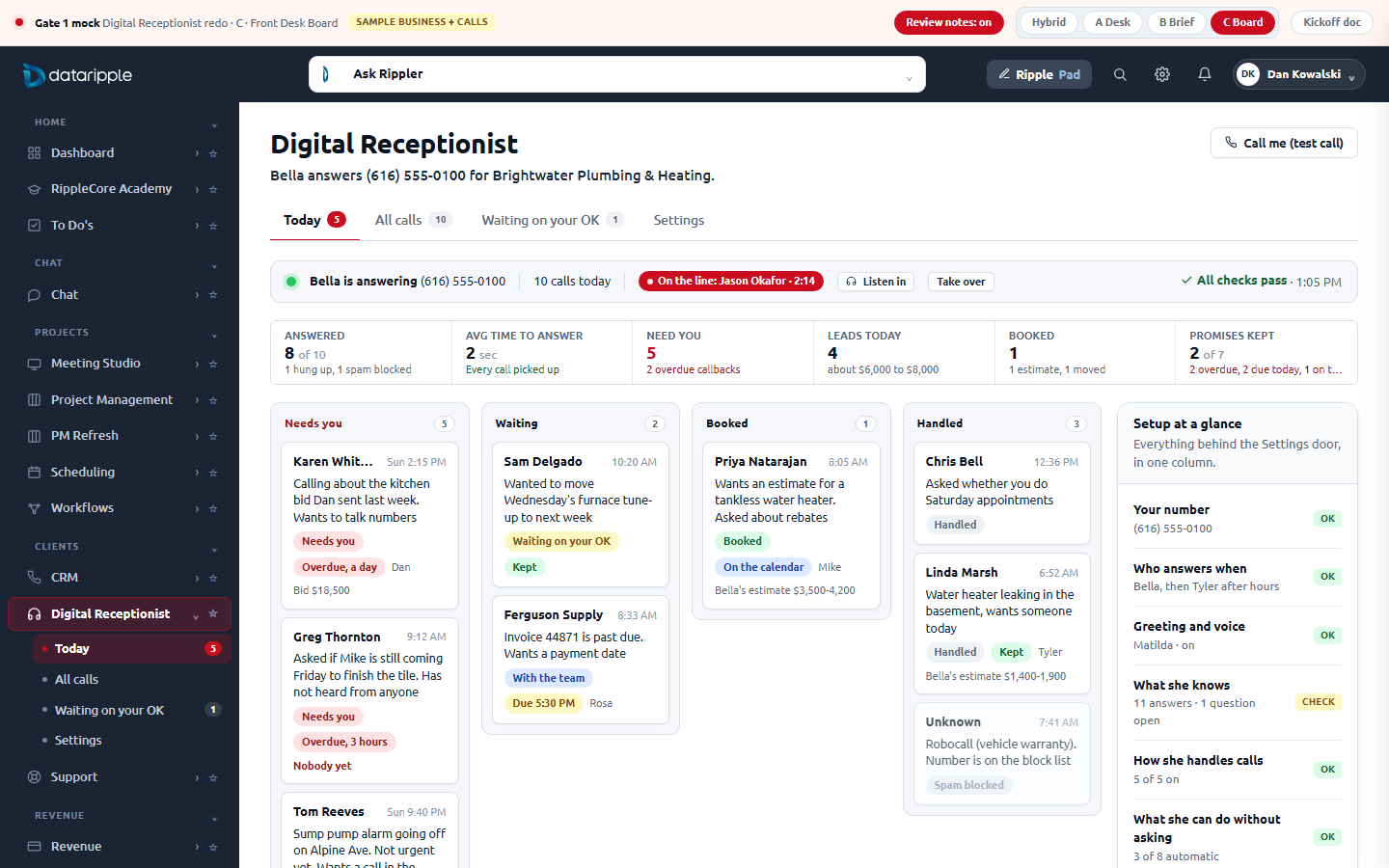
What ships on today's worker, what needs one small table, what needs the extraction step
| Tier | Capability | Verdict | The real blocker, or why it is free |
|---|---|---|---|
| Must | Status line on every page (answering / issues / not answering, number, live call) | OK Wave 1 | GET /phone/diagnostics returns overall_status and the number today; GET /calls exposes in_progress calls. Pure frontend. |
| Must | Today: slips from real calls (who, when, number, what they wanted, urgency, what she did, outcome) | OK Wave 1 | Every field is on PhoneCall already (caller, number, city, duration, status, summary, intent, urgency, outcome, routed_to, preferred_callback, estimated_value, is_qualified_lead, contact_id). |
| Must | "Needs you" derived deterministically (voicemail, preferred_callback set, outcome not completed, unanswered question, pending approval) | Partial | Derivable from existing fields for the first version. Without a stored state it cannot be cleared: see the Done row. |
| Must | The Settings door (seven renamed sections, every control kept) | OK Wave 1 | Same endpoints, same forms, moved and relabelled. Zero backend. The nine /dashboard/receptionist/*.html routes keep working as redirects. |
| Must | Opened slip with recording and transcript | OK Wave 1 | GET /calls/:id + the authed recording proxy exist and work in v3 today. |
| Must | Call back / Text back | Partial | Call back is a tel: link. Text back goes through the worker's /dashboard/sms/* hub (threads + send). Corrected after reading the worker: /sms/send and /sms/conversations do not exist (they 404); the exact hub paths are open question 2 in the handoff. |
| Must | Approvals with the exact change verbatim | OK Wave 1 | Better than the kickoff assumed: /dashboard/pending-actions already projects args (the immutable proposed change) and the table holds editable_payload with a PATCH /:id route, so "Edit first" is real. The frontend renders the change per action type; two actor columns get added to the projection for the stamps. |
| Must | All calls with search and filters | OK Wave 1 | The list already loads client-side (100 rows). Filter and search are frontend. Server paging is a later concern (noted in the business rules). |
| Should | Done, owner, hand to a teammate (a human closes; "left a message" reopens tomorrow) | Gated | No column on calls. Needs a call_followups table (call_id, state, owner_id, due_at, closed_by, closed_at, outcome) and three routes (PUT state, PUT owner, GET open). Team roster exists (/api/team). Notification via the existing chat/notification path. |
| Should | Book a visit from a slip (real open slots) | Partial | POST /dashboard/appointments exists but takes a fixed start time. The free-slot lookup the receptionist uses during calls is not exposed as an endpoint for the dashboard. One read route. |
| Should | "Used N times" on each answer | Gated | No usage counter. Increment at the knowledge gate in elevenlabs.ts when an article is loaded into a call, or log per call. Small. |
| Should | Receptionist-only activity feed | Partial | /dashboard/activity reads agent_pending_actions with no source filter, so Meeting Studio rows appear on the receptionist page today. One source_kind filter parameter fixes it (the column exists). |
| Should | What they wanted, in one line | Partial | Found in the worker: today's "summary" is not a model call. PostCallProcessor.generateSummary truncates the first caller sentence to 120 characters and caller_intent is never written. Wave 1 shows the lead fields the agent saves mid-call (service type and description) with that first sentence as the fallback; the real one-liner is part of the Wave 2 extraction step. |
| Differentiator | Promise ledger ("said in your name", due time, kept / overdue, hear it) | Gated | Needs a post-call extraction step (a model judgment: which sentences are commitments, due when) writing a call_commitments table, plus a deterministic overdue check on a cron and a "kept" write from the Done flow. Transcript timestamps for "hear it" depend on the provider's word timings. |
| Differentiator | Questions she could not answer → published answer → proof of use | Mostly built | Better than the kickoff assumed: the agent's save_question tool already writes a knowledge row with status unanswered, source ai_call, the call id and the caller's question, and a count endpoint exists. So the Today card and the What she knows banner are Wave 1. Missing for Wave 2: the drafted answer, a published-by stamp, and the "answered from your approved answer" line on later messages. |
| Differentiator | Listen in on a live call | Gated | Transfer and end call exist (POST /calls/:id/transfer, /cancel); there is no live audio stream to the browser. Take over ships; Listen in waits. |
| Differentiator | "Read it to me" (the brief in her voice) | Gated | TTS exists (POST /voices/preview); the brief text generator does not. Cheap once the BLUF is computed server-side. |
| Differentiator | Contradiction check (quoted $180 today, $150 to the last three callers) | Later | Deterministic once the commitments table and the approved-answer table exist. The chief of staff's suggestion; Wave 3. |
| Should | Documents on file (the caller's estimates, invoices, contracts, drawings and vendor bills on the Triage card and in the drawer) | Partial | No CRM document store exists. The card is one union read (GET /calls/:id/documents) over quotes, invoices, contract_summaries, the project vault and drawings, and pm_invoices, all reachable from calls.contact_id (which needs its writer) or projects.crm_source_call_id. Stored files open inline in Wave 1 through the routes that already stream them; estimate and invoice PDFs are Wave 2 (rendered with the existing contract renderer). No new table. |
| Differentiator | Text a document to the caller from the viewer | Gated | The worker has no public or signed file URLs (every download streams through the worker with private, no-store), so this needs a short-lived share token (7 days, revocable, logged) and the SMS hub. Wave 2, and never for vendor callers. |
Ship the hybrid home on today's worker, plus one small table
Wave 1 (recommended)
- The shell: four tabs (Today, All calls, Waiting on your OK, Settings) replacing nine; sidebar sub-nav shrinks to four. Old routes redirect.
- Today: status line, BLUF band computed from
/summary+/phone/diagnostics, the slip pile from/calls, "Needs you" derived from existing fields. - The message drawer: recording, transcript, details, Call back, Text back (through the
/dashboard/smshub), Book (existing appointment route with a picked time), the question she could not answer. - Waiting on your OK: exact change verbatim (one projection field added), Approve / Decline / Edit first, the receptionist-only feed with who-and-when stamps.
- Settings door: seven sections, every control kept, plain names. Zero endpoint changes.
- The one new table:
call_followupsso owner, due time, "how did it go", hand-off and Done are real, not derived. Three routes.
Council must-not-do, checked against the mock
No invented vocabulary (every word on the screens is one a contractor's office says out loud). One obvious default per message, the rest quieter. Handled work is a count. Plumbing is behind the door. Promises are their own lines with a source. Every open item has a name and a due time. Done is a human act with a name and a time.
AppliedWhat the mock does not claim
No real calls, texts, bookings, approvals or saves. The "used N times", promise, source, owner and done values are sample. Every dialog that would hit an endpoint names it while Review notes is on.
SampleRun it locally
node mockups/receptionist-refresh/_serve.mjs then http://localhost:4650/. Desktop 1440x900. 44 scripted click-through steps across all four homes, the drawer, both list pages and all seven Settings sections: zero console errors, every control responds.